
Spreadsheet coordination vs live fleet workflow
Vehicle spreadsheets vs shared fleet management software.
Spreadsheets are useful for static vehicle lists, imports and lightweight booking plans. They become harder to keep current when reservations, checkouts, returns, faults and vehicle readiness need to agree across employees.
Illustrative workflow comparison, not a measured study of software performance or a guaranteed return on investment.
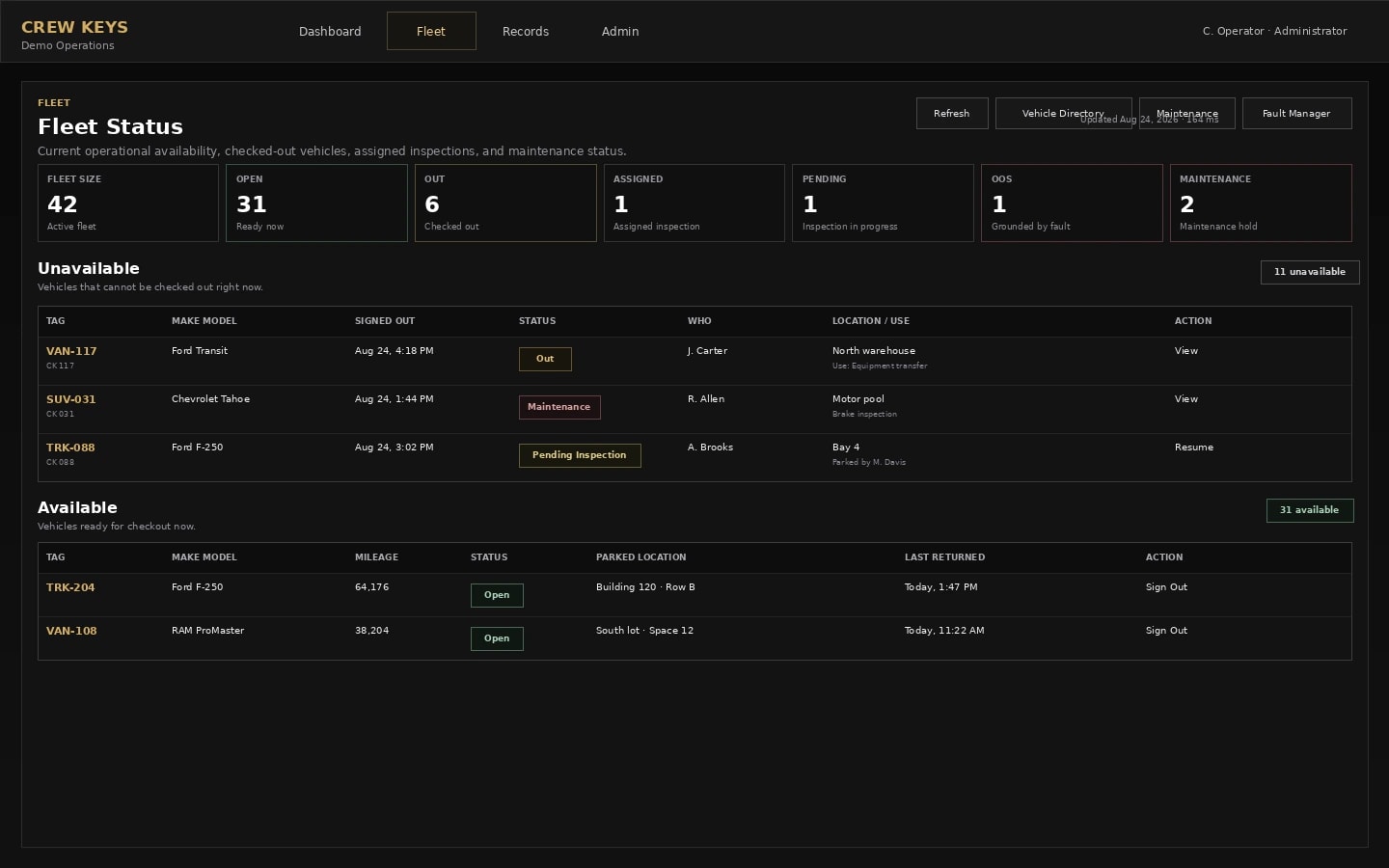
What the actual product records
A documented vehicle workflow, not automatic physical tracking.
This is an actual Crew Keys interface with fictional demonstration data. It illustrates the record available to a manager—not a representation of the alternative paper, spreadsheet or GPS software.
Side-by-side workflow comparison
Compare the information each method can actually give you.
These are workflow capabilities and limitations, not claims that every spreadsheet, GPS provider or paper process behaves identically.
| Question | Existing or alternative process | Crew Keys shared-vehicle record |
|---|---|---|
| Current vehicle status | Reconcile manually entered tabs, latest edits, messages and key desk knowledge. | See the application status derived from recorded reservations, checkouts, returns and maintenance flags. |
| Booking conflicts | Maintain spreadsheet permissions and check for overlapping rows or stale copies. | Use vehicle reservation workflows and keep future bookings distinct from checkout. |
| Inspection and faults | Move reported findings between tabs or files and coordinate who follows up. | Keep operator-reported inspections and unresolved fault records tied to a vehicle. |
| Import and export | Spreadsheets remain portable but require careful validation. | Import existing vehicle lists with review; export supported operational records when needed. |
Model your own administrative time
Enter time today and time you think the alternative could require.
Unlike a fixed percentage claim, this model lets you set both values. It can show a possible increase in work as well as reduced administrative effort.
Editable scenario · Not a savings promise
What would a change in administrative time mean for your fleet?
Per fleet-status or vehicle-coordination task. The starting figures are examples, not Crew Keys customer results. Replace them with your own estimates.
Calculated as (current minutes − estimated alternative minutes) × tasks per week × 52 weeks ÷ 60. If alternative time is higher, the result represents additional effort, not savings.
Important: Estimate only repeated status chasing, reconciliation or booking coordination. Crew Keys does not eliminate all data entry and requires correct user submissions. This model excludes software subscriptions, training, setup, errors, taxes and any verified financial ROI. A labor-time equivalent is not money you automatically save or recover.
Choosing the right tool
When an Excel fleet tracker is the right choice
A single fleet owner managing a stable roster may not need a live application. Spreadsheets are also valuable for a one-time import, audit extract or offline backup. The decision changes as daily coordination and handoffs grow.
Useful next steps
Straight answers
Questions about this comparison.
Can Crew Keys import an existing vehicle spreadsheet?
Yes. The vehicle import flow reviews creates, updates, unchanged rows and conflicts before applying selected changes.
Is a reservation spreadsheet the same as an actual checkout record?
No. A reservation reflects planned use. A checkout records the actual selected vehicle, operator and submitted handoff details.
Will replacing spreadsheets automatically reduce administration costs?
No. The editable model is a scenario, not an observed savings result. Compare your own before-and-after times, including continued inspections and system administration.
From comparison to a real workflow
Check how shared-vehicle accountability would work for your team.
Explore a fictional demo before creating an organization. Actual results depend on how staff use the workflows and what inspections and handoff rules you require.