
Security and Trust
Security built into everyday fleet operations.
Crew Keys protects organization data with scoped access, server-side authorization, secure credential handling, deployment-level backup controls, export controls, and durable audit history. The goal is straightforward: keep fleet data private to the right organization, available when needed, and controlled by the people responsible for it.
Product proof
Access can be limited. Important changes remain reviewable.
Role-based access and administrative audit history work together: people receive the capabilities they need, while sensitive changes leave a durable record.

Assign a role, then see exactly what that member can do.
Operational roles separate day-to-day fleet work from access administration and other sensitive controls.
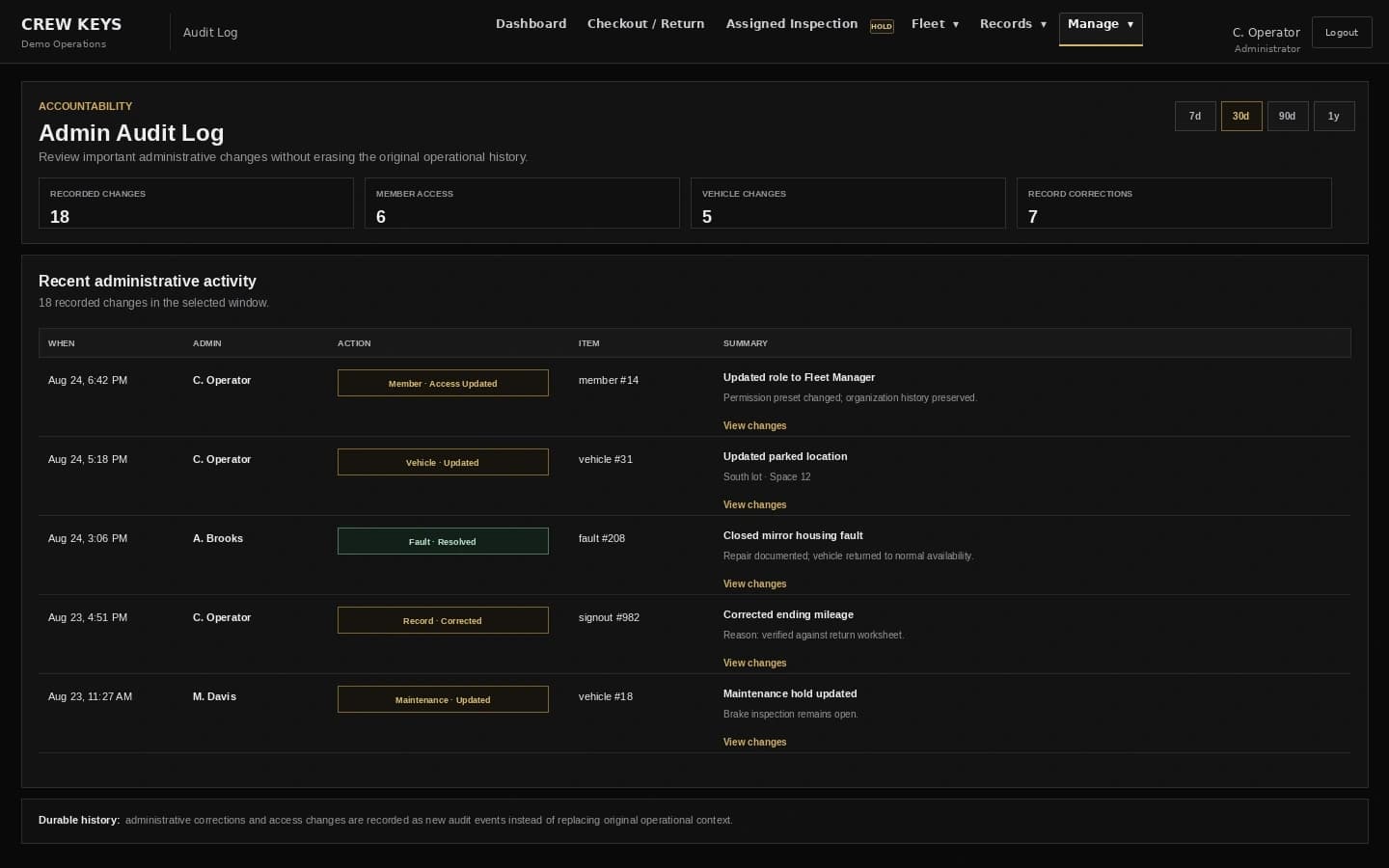
Administrative changes leave a reviewable trail.
Corrections and access changes are recorded as events instead of silently replacing the original operational context.
Current Crew Keys UI · fictional demonstration data
How is my data protected?
Crew Keys keeps each organization separated at the application and database-query level. Server-side authorization checks organization ownership and user permissions before protected data is read or changed.
Account passwords and member PINs are stored as one-way bcrypt hashes rather than readable passwords. Signed-in sessions use protected cookies that are HttpOnly and SameSite, with secure cookies used over HTTPS.
Is data encrypted?
Crew Keys production traffic is served over HTTPS so information is encrypted while moving between the browser and the application.
Crew Keys requires encrypted database connections in production by default. Encryption at rest and backup protection are infrastructure controls supplied by the production managed-database service and are verified as part of deployment operations rather than implemented in browser code.
Are backups available?
Crew Keys is designed to run against a managed production database with automated backups and point-in-time recovery. The actual recovery window is an infrastructure setting and must be verified on the production database cluster rather than inferred from the application.
Application updates do not require replacing the database, so routine deployments can occur without discarding organization history.
Can users see another organization's records?
No. Workspace data is organization-scoped, and protected server routes validate the signed-in user's organization before returning or changing records.
Within the same organization, visibility is intentional: members can be allowed to see the roster and operational history needed to coordinate a shared fleet, while administrative edits, access management, maintenance controls, exports, and other sensitive actions remain capability-controlled.
Can coworkers see each other's records?
Crew Keys is built for shared fleet operations, so users inside the same organization may be allowed to see operational records and roster information that helps the team understand vehicle custody and history.
Viewing information does not automatically grant editing or administrative control. Capabilities for changing records, managing members, exporting data, maintenance, faults, and other sensitive actions are assigned separately.
What happens when someone leaves?
Administrators can revoke account access or deactivate a member without erasing the history attached to that person. Active checkout, assigned-inspection, or roster-linked maintenance custody must be closed before deactivation; unfinished checkout holds are released and completed records remain preserved for accountability.
Revoking administrator access invalidates that administrator's active access while keeping historical records and the member's operational identity intact.
Can I export my data?
Yes. Authorized users can export the vehicle directory to a spreadsheet and produce printable or exportable operational record views and vehicle-history reports. Export permissions can be limited separately from ordinary record viewing.
Crew Keys is built so the organization remains the practical owner of its operational information rather than trapping essential fleet history inside a single screen.
Who can make changes?
Crew Keys separates ordinary operational use from administrative capabilities. Permissions can be assigned for areas such as vehicles, maintenance, faults, records, member management, exports, and checkout administration instead of giving every signed-in user the same level of control.
Important administrative and lifecycle changes are recorded through application audit logging so organizations can review who performed sensitive actions.
Report a security concern
Security questions or suspected vulnerabilities can be sent through the Crew Keys contact page. Include enough detail to investigate the issue, but do not send passwords, PINs, or other secrets.
Questions?
Talk with Crew Keys about your deployment.
Use the contact form for product, security, implementation, or procurement questions.
Contact Crew Keys