
Fleet dispatch software
Fleet dispatch software for handing employees the right shared vehicle—and keeping the record current.
Crew Keys supports the kind of fleet dispatching that happens at a shared vehicle desk: review live availability, match an employee to the correct vehicle, record the actual handoff, complete the required inspection, and confirm the return. It is designed for companies and organizations coordinating pooled vehicles rather than commercial route planning.
Current product UI
Dispatch the vehicle and create the accountability record at the same time.
The selected vehicle, responsible operator, purpose, destination, mileage, and inspection path stay together instead of being split between a dispatch board and a separate sign-out log.
Current Crew Keys UI · fictional demonstration data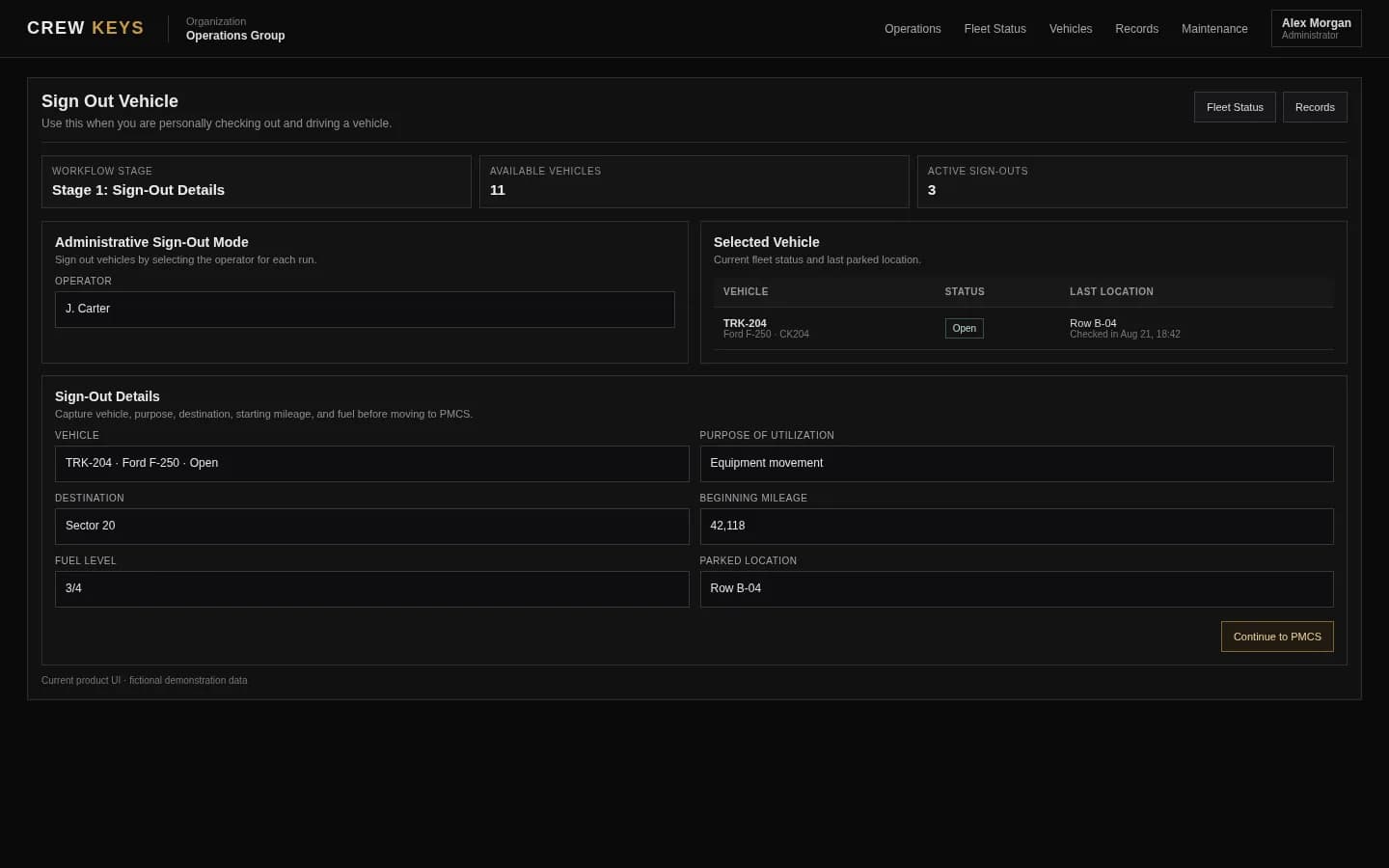
What it solves
Combine daily vehicle assignment with the record you need afterward.
Dispatch from current availability
Choose from vehicles that are actually available instead of assigning a unit already checked out, in maintenance, or out of service.
Verify the actual vehicle that leaves
Keep the responsible employee, actual vehicle, purpose, destination, time out, and mileage in one record—even when the employee takes a different unit than originally expected.
Return closes the dispatch loop
Ending mileage, fuel, parked location, notes, and faults update the same vehicle state used for the next assignment.
Workflow
A simple shared-fleet dispatch workflow.
- 01
Review fleet status
See what is available and what is already committed or unavailable.
- 02
Assign the vehicle
Select the operator, vehicle, purpose, destination, and starting mileage.
- 03
Complete the required inspection
Use the organization checklist before the vehicle enters normal use.
- 04
Return and release
Close the checkout with return details so the vehicle can re-enter the available pool.
Active Checkout
Operator, trip, mileage, fuel, and vehicle stay on one operational record.
| Vehicle | Operator | Out | Beg Miles | Fuel | Purpose | Destination |
|---|---|---|---|---|---|---|
| TRK-204 Ford F-250 | J. Carter | Aug 13, 18:42 | 64,118 | 3/4 | Equipment run | North Yard |
Example only · fictional checkout data
Connected product views
See dispatch before and after the assignment.
Dispatch starts from current availability and ends with a completed return rather than a separate scheduling record.
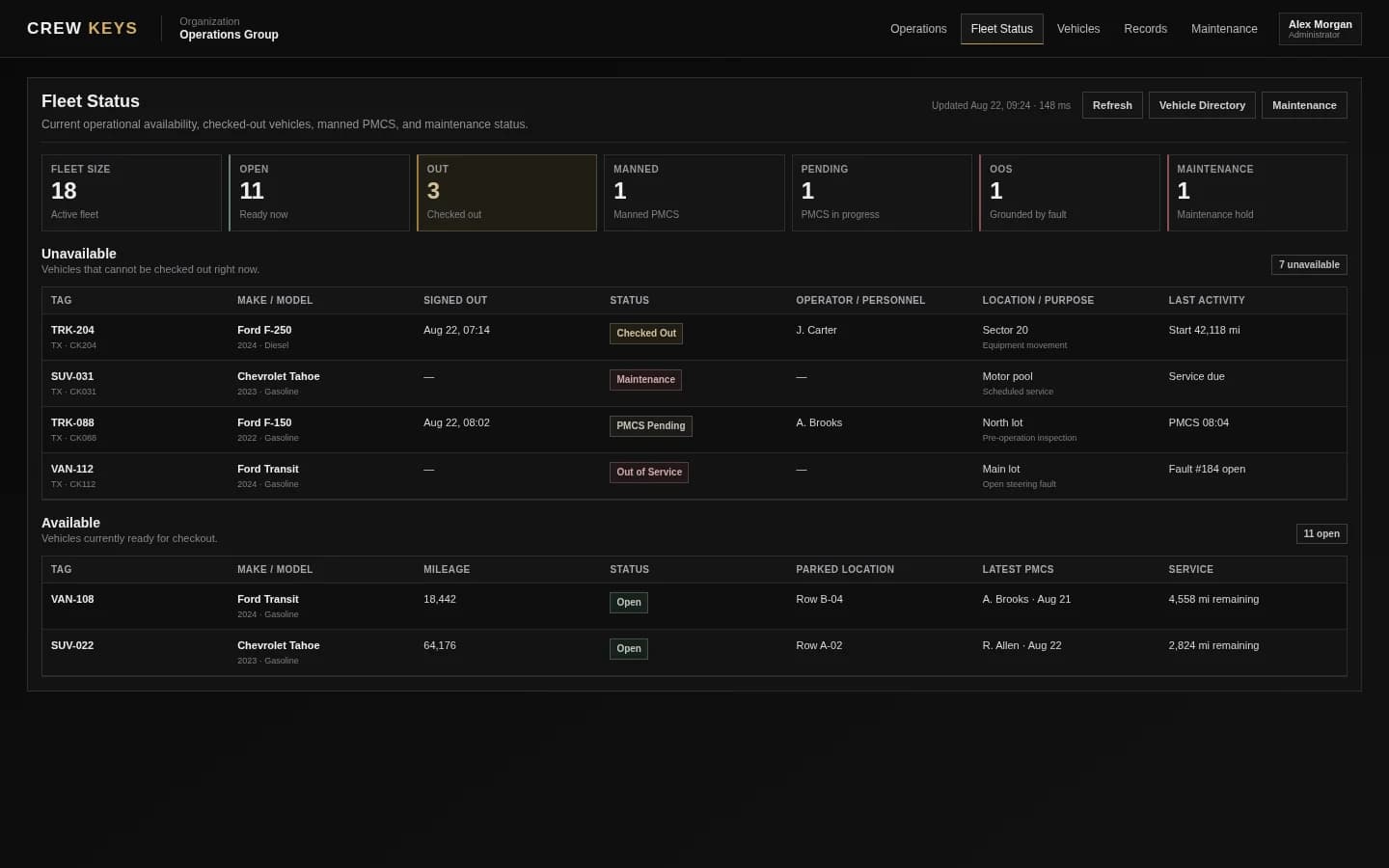
Choose from vehicles the system currently considers usable.
See fleet availability
Close the assignment with mileage, fuel, location, and condition.
See vehicle returnCurrent Crew Keys UI · fictional demonstration data
Who it fits
For dispatching pooled vehicles, not routing a commercial trucking network.
Companies dispatching pooled cars, vans, trucks, or specialty vehicles to employees throughout the day.
Companies where a dispatcher, receptionist, supervisor, or fleet coordinator physically releases vehicle keys to employees.
Teams using spreadsheets, whiteboards, key racks, or sign-out binders to coordinate which person gets which shared vehicle.
Operational Records
Checkout, inspections, returns, mileage, faults, and preventive maintenance stay attached to history.
| Type | Status | Vehicle | Operator / Inspected By | Started | Returned | Faults |
|---|---|---|---|---|---|---|
| Checkout | Out | TRK-204 | J. Carter | Aug 13, 18:42 | — | 0 |
| Inspection | Complete | VAN-108 | A. Brooks | Aug 13, 15:18 | Aug 13, 15:26 | 1 |
| Checkout | Returned | SUV-022 | R. Allen | Aug 13, 09:03 | Aug 13, 13:47 | 0 |
Example only · fictional records and operators
Questions
Fleet dispatch software questions.
What kind of fleet dispatch does Crew Keys support?
Crew Keys focuses on shared-vehicle assignment and accountability: current availability, operator, vehicle, purpose, destination, mileage, inspection, faults, and return.
Is Crew Keys route optimization software?
No. Crew Keys is designed for shared-fleet custody and operational dispatch rather than commercial route planning or load optimization.
Can dispatchers see whether a vehicle is already in use?
Yes. Fleet Status shows current operational availability, including checked-out, maintenance, inspection-held, pending, and out-of-service states.
Does the dispatch become a searchable record?
Yes. The resulting checkout and return remain in operational and vehicle history.
Related workflows
Keep exploring Crew Keys.
Start dispatch from the current fleet state.
See fleet availability Vehicle checkout softwareCapture the full vehicle custody workflow.
See vehicle checkout Vehicle return and check-inClose the assignment and update the fleet state.
See vehicle return Dispatcher-managed fleetsSee how a staffed key desk can evolve toward exception-based oversight.
Explore dispatcher-managed fleets Company vehicle poolsSee the employee-sharing model Crew Keys is built around.
Explore company vehicle poolsFounder-assisted setup
Want Crew Keys set up for your fleet?
Tell me roughly how many vehicles you manage and how you check them out today. I’ll help you import the fleet, configure the first workflow, and get your trial operating without making you figure out the setup alone.
One shared fleet record
Turn shared-vehicle dispatch into a durable operational record.
Start with current availability, assign the vehicle and operator, capture destination and mileage, complete the inspection, and close the assignment on return.
Create organization