
Company vehicle usage tracking
Company vehicle usage tracking and accountability software.
When employees share company cars, vans, and trucks, managers need more than a reservation calendar. Crew Keys records who actually checks out a vehicle, when it leaves, its reported destination and starting mileage, and the details entered when it returns. Review vehicle usage history and current custody from the same fleet record. This is employee-reported operational tracking, not GPS location tracking or automated trip detection.
30-day full-product trial · No card required. Try vehicle checkout, return, and searchable fleet records with your own vehicles. Prefer guided setup? Contact the creator →
Current product UI
Look back at vehicle use without reconstructing a paper log.
Each recorded checkout and return connects the vehicle, operator, time, mileage, and trip context. Managers can review the completed history after the vehicle is back.
Current Crew Keys UI · fictional demonstration data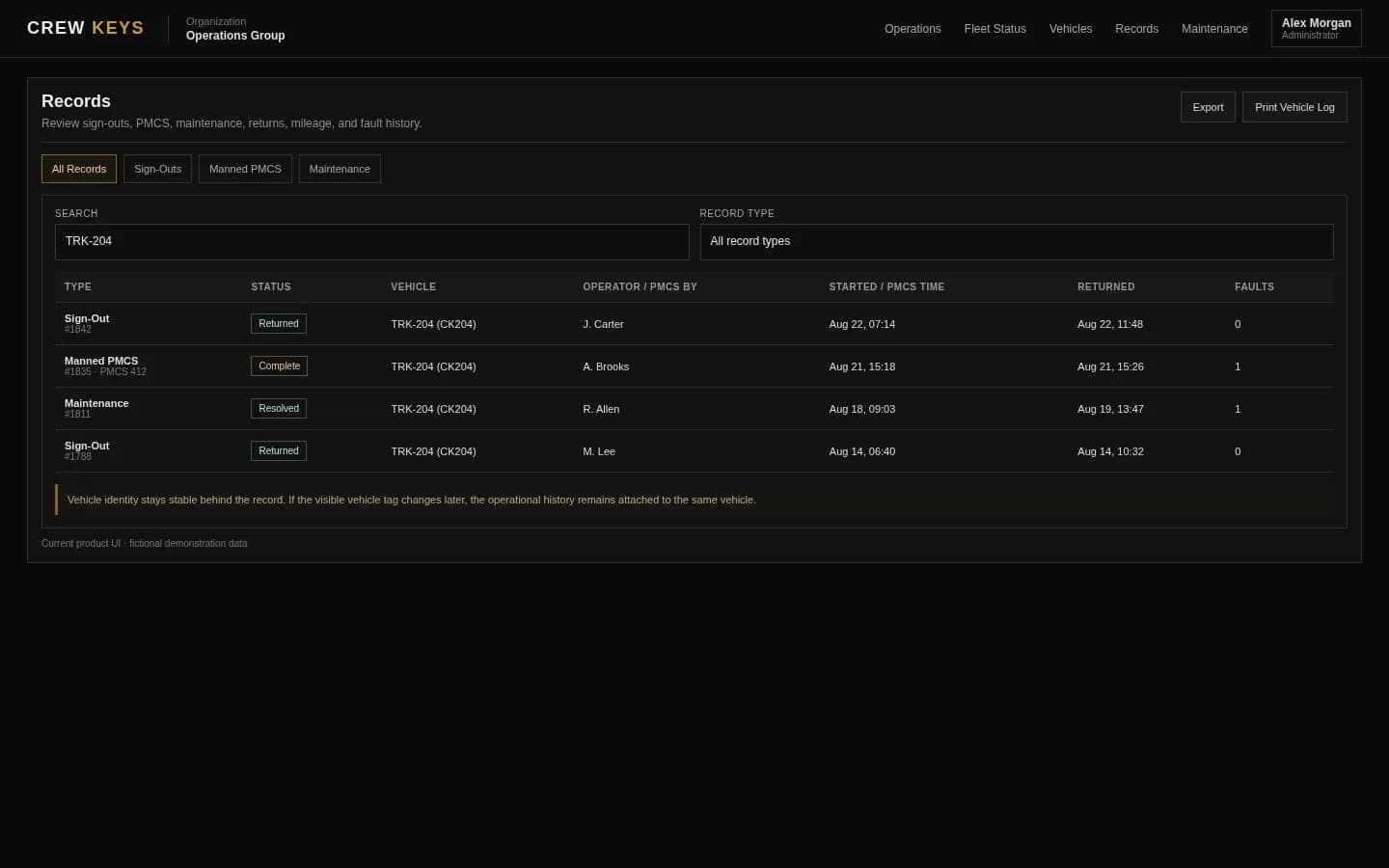
What it solves
Replace company vehicle usage logs that go stale as soon as the keys move.
Actual driver accountability
Record the person who takes the vehicle at checkout, even when a team or another employee made the advance reservation.
Vehicle usage history
Keep checkout and return times, trip purpose, destination, mileage, reported fuel and return information attached to the vehicle record.
Current custody versus past use
See which vehicles are checked out now and review completed records separately; a reservation alone does not establish actual use.
Operational follow-through
Link issues found during inspection or return to faults, maintenance decisions and future vehicle readiness.
Operational Records
Checkout, inspections, returns, mileage, faults, and preventive maintenance stay attached to history.
| Type | Status | Vehicle | Operator / Inspected By | Started | Returned | Faults |
|---|---|---|---|---|---|---|
| Checkout | Out | TRK-204 | J. Carter | Aug 13, 18:42 | — | 0 |
| Inspection | Complete | VAN-108 | A. Brooks | Aug 13, 15:18 | Aug 13, 15:26 | 1 |
| Checkout | Returned | SUV-022 | R. Allen | Aug 13, 09:03 | Aug 13, 13:47 | 0 |
Example only · fictional records and operators
Workflow
How company vehicle usage becomes a record managers can review.
- 01
Check availability
Use the current vehicle status to identify a ready vehicle or review any upcoming reservation.
- 02
Record the handoff
The operator or an authorized dispatcher records the actual driver and the vehicle checkout details.
- 03
Close the return
Enter ending mileage, fuel, parked location, and any condition or return notes when the vehicle comes back.
- 04
Review recorded use
Filter or export operational history to investigate who took a vehicle, when it was used and what was reported.
Active Checkout
Operator, trip, mileage, fuel, and vehicle stay on one operational record.
| Vehicle | Operator | Out | Beg Miles | Fuel | Purpose | Destination |
|---|---|---|---|---|---|---|
| TRK-204 Ford F-250 | J. Carter | Aug 13, 18:42 | 64,118 | 3/4 | Equipment run | North Yard |
Example only · fictional checkout data
Connected product views
Usage history starts at checkout and ends at return.
Crew Keys uses actual operator actions to build the usage record; a future reservation does not count as a completed trip.
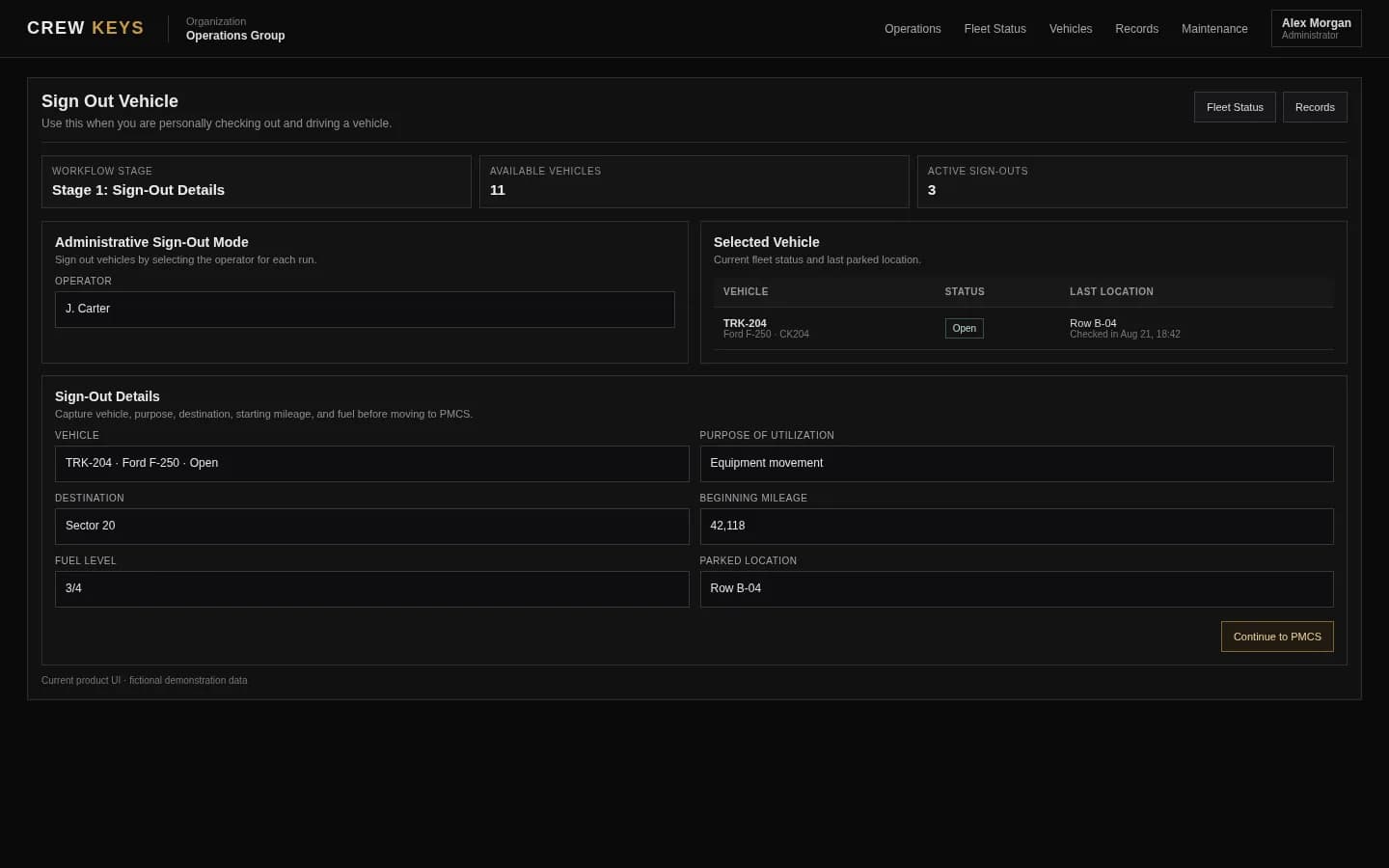
Record who is taking the vehicle and why.
See employee vehicle checkout
Close the usage record when the vehicle comes back.
See vehicle returnsCurrent Crew Keys UI · fictional demonstration data
Who it fits
For teams sharing company vehicles across employees and departments.
Small businesses sharing company trucks, vans or cars across staff rather than assigning every vehicle to one permanent driver.
Facilities, nonprofit and field-service teams that need a company vehicle usage log without continuous GPS monitoring.
Fleet coordinators moving from key sign-out binders, shared vehicle spreadsheets or department booking calendars to auditable checkout and return history.
Completed Return
Ending mileage, fuel, parking location, notes, and faults close the record.
| Vehicle | Returned | End Miles | Fuel | Parked | Faults | Notes |
|---|---|---|---|---|---|---|
| SUV-022 Chevrolet Tahoe | Aug 13, 13:47 | 64,176 | 3/4 | Row B · Space 4 | 0 | No new issues |
Example only · fictional return data
Questions
Questions about tracking company vehicle usage.
How do I track which employee used a company vehicle and when?
Each completed checkout and return links the recorded operator to the vehicle, times, trip context and reported odometer readings. Managers can review the history instead of reconstructing a paper sign-out log.
Is vehicle usage tracking the same as GPS vehicle tracking?
No. Crew Keys records events submitted during vehicle checkout, inspections and return. It does not automatically detect trips, calculate routes or display a live GPS vehicle location.
Can we identify the actual driver if someone else reserved the vehicle?
Yes. Reservations plan future vehicle use, while checkout identifies who actually takes custody. The reservation holder and actual driver need not be assumed to be the same person.
Does it track company vehicle mileage?
Crew Keys records reported starting and ending odometer readings as part of the handoff and return workflow. It does not continuously measure mileage using hardware.
Do we need to use vehicle reservations?
No. An organization can use checkout and return for immediate vehicle use without requiring advance reservations, or combine both workflows.
Can I find completed vehicle usage records later?
Yes. Authorized users can review operational records by vehicle and other available record filters, and use the supported export tools.
Does Crew Keys prevent drivers from omitting or misreporting information?
The workflow provides required fields and configured inspections, but it still depends on people completing the handoff and reporting accurate readings. It is not an automatic hardware verification system.
Related workflows
Connect usage records to the rest of fleet operations.
Capture who physically takes a company vehicle and its starting mileage.
See vehicle checkout Vehicle return and check-inClose usage with mileage, fuel, parked location and any new issues.
See vehicle return Shared vehicle managementSee how bookings, custody, readiness and fleet history fit together.
Explore shared fleets Fleet availabilityFind out which company vehicles are ready and which are currently in use.
See fleet availability Vehicle reservationsSchedule future use separately from the actual driver record.
Explore Vehicle reservations Digital vehicle sign-out logsCompare a paper usage log with an ongoing digital history.
See the digital recordFounder-assisted setup
Want Crew Keys set up for your fleet?
Tell me roughly how many vehicles you manage and how you check them out today. I’ll help you import the fleet, configure the first workflow, and get your trial operating without making you figure out the setup alone.
One shared fleet record
See who used each company vehicle and when.
Keep reported driver, vehicle, trip purpose, mileage, condition and return activity together without requiring GPS hardware or a separate usage spreadsheet.
30-day full-product trial · No card required. Ask the creator about setup →