
Vehicle checklist app
A vehicle checklist app built for fleet inspections and accountability.
Crew Keys is a fleet inspection checklist app for shared vehicles that turns vehicle inspections and preventive maintenance checks into operational records. Inspection findings, issue details, faults, mileage, checkout context, repair documentation, and fleet readiness stay tied to the vehicle instead of disappearing onto a separate paper form.
Current product UI
See how an inspection finding becomes part of the vehicle record.
Operators mark checklist items, enter issue detail, and preserve qualifying findings as open faults instead of leaving the result trapped on a paper inspection sheet.
Current Crew Keys UI · fictional demonstration data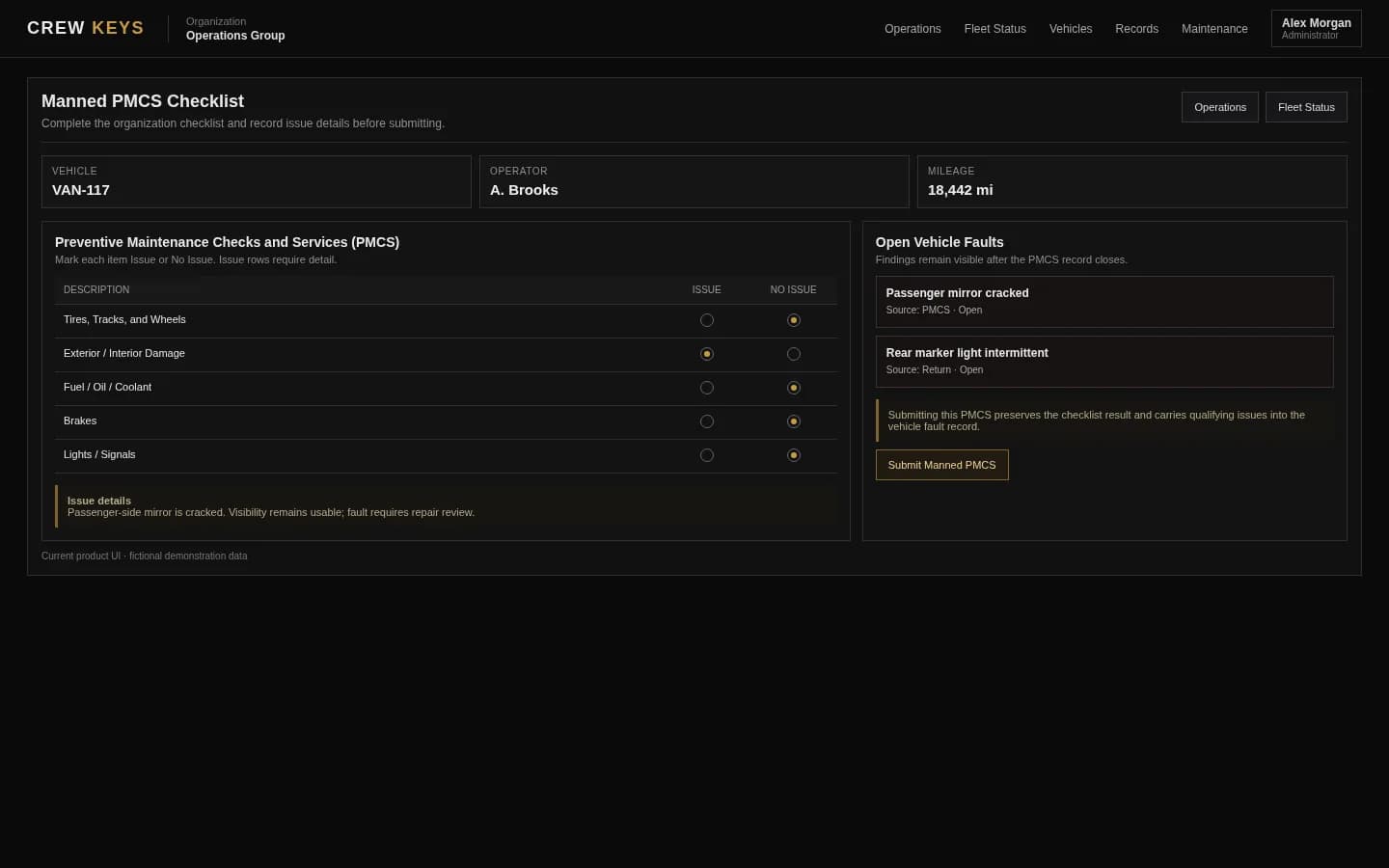
Mobile workflow
The vehicle inspection is designed to be completed beside the vehicle.
Members can move through inspection items, mark an issue or no issue, add condition detail, and complete the handoff directly from a phone while they are standing at the vehicle.
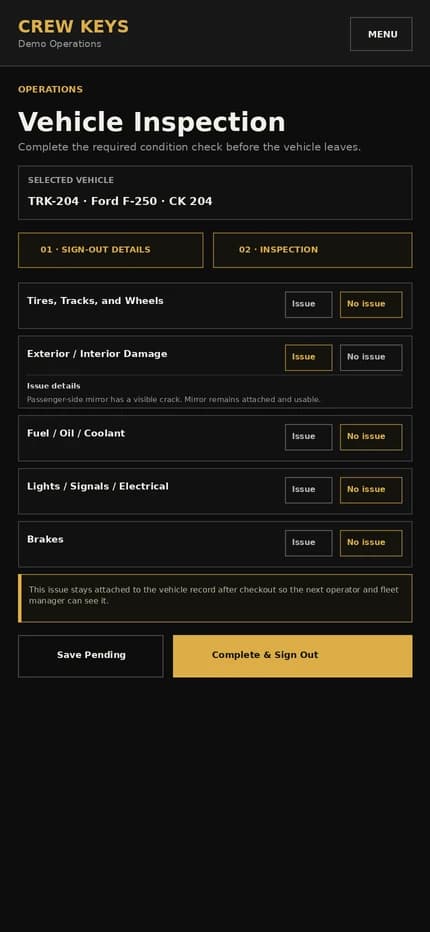
Current responsive Crew Keys UI · fictional demonstration data
What it solves
Replace paper fleet inspection checklists with a live vehicle record.
Configurable vehicle checklists
Create the inspection rows your organization actually uses instead of forcing every car, truck, van, or specialty vehicle into a generic paper checklist.
Fleet inspection faults that stay visible
Reported issues can carry forward as unresolved vehicle faults until an administrator records the repair or resolution.
Inspection history with context
Review checklist findings alongside the operator, checkout record, mileage, and vehicle history that produced them.
Vehicle Inspection & Preventive Maintenance
Use the same Issue / No Issue checklist pattern operators see inside Crew Keys.
| Description | Issue | No Issue |
|---|---|---|
| Tires, Tracks, and Wheels | ||
| Exterior / Interior Damage | ||
| Fuel / Oil / Coolant | ||
| Brakes | ||
Example only · fictional inspection data · layout mirrors the operational vehicle checklist
Workflow
How the fleet inspection checklist works in Crew Keys.
- 01
Start from the vehicle
Select the vehicle in the operational workflow so every fleet inspection result is attached to the correct vehicle record.
- 02
Complete the inspection checklist
Operators record checklist status and issue detail instead of filing a disconnected vehicle inspection form.
- 03
Create persistent faults
Relevant inspection findings become open vehicle issues that remain visible beyond a single checkout.
- 04
Resolve with accountability
Administrators can review, repair, and close faults while keeping the historical inspection source intact.
Open Vehicle Faults
Inspection findings remain visible until they are repaired or resolved.
| Vehicle | Fault | Status | Source | Reported |
|---|---|---|---|---|
| VAN-117 | Passenger mirror cracked | Open | Inspection | Aug 13 |
| SUV-031 | Brake inspection required | Maintenance | Return | Aug 12 |
Example only · fictional fault data
Connected product views
See where inspection findings go next.
A completed checklist is not the end of the information. Findings can remain visible as faults and become part of the vehicle history.
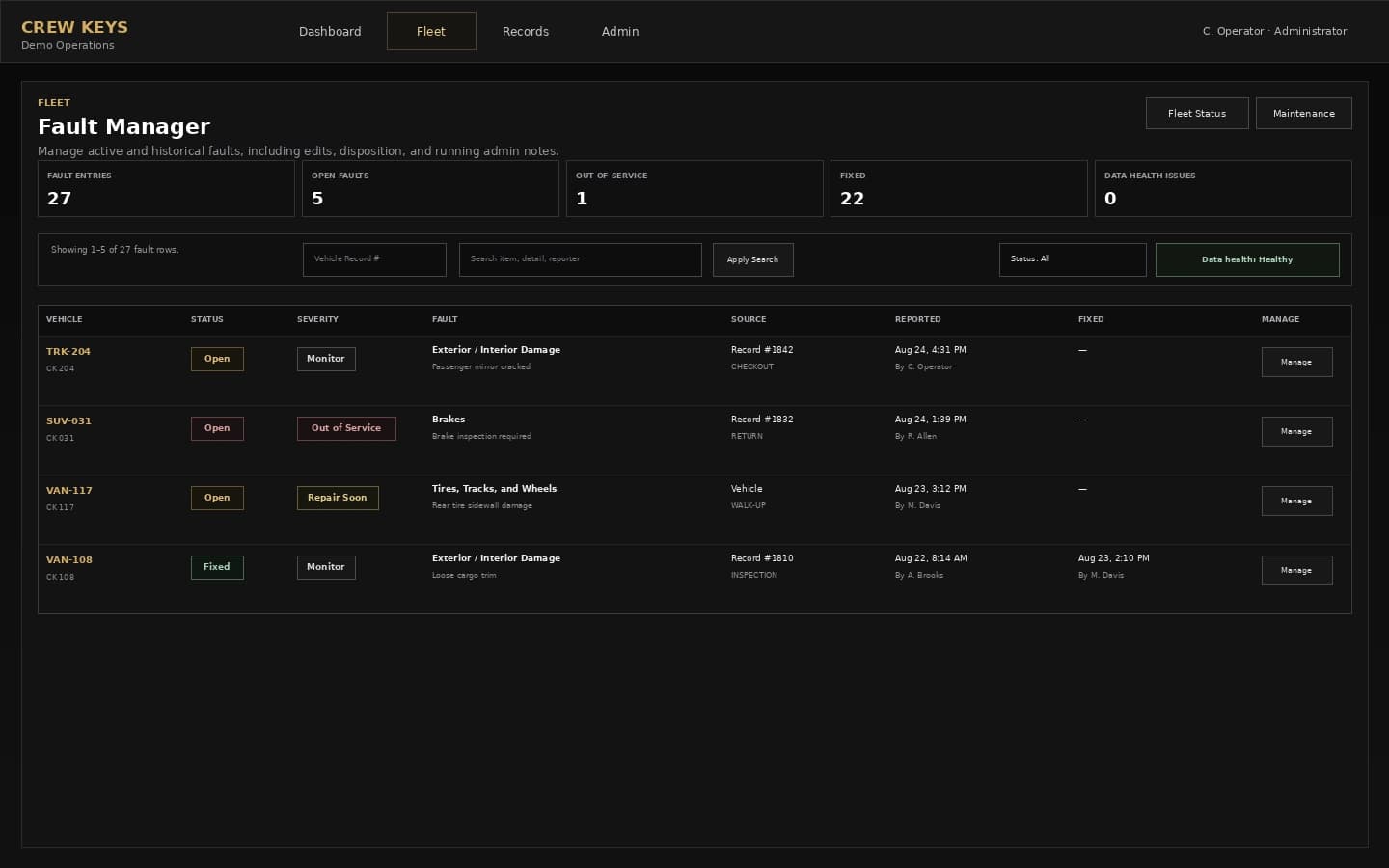
Problems that still need action remain visible after the inspection closes.
See fault tracking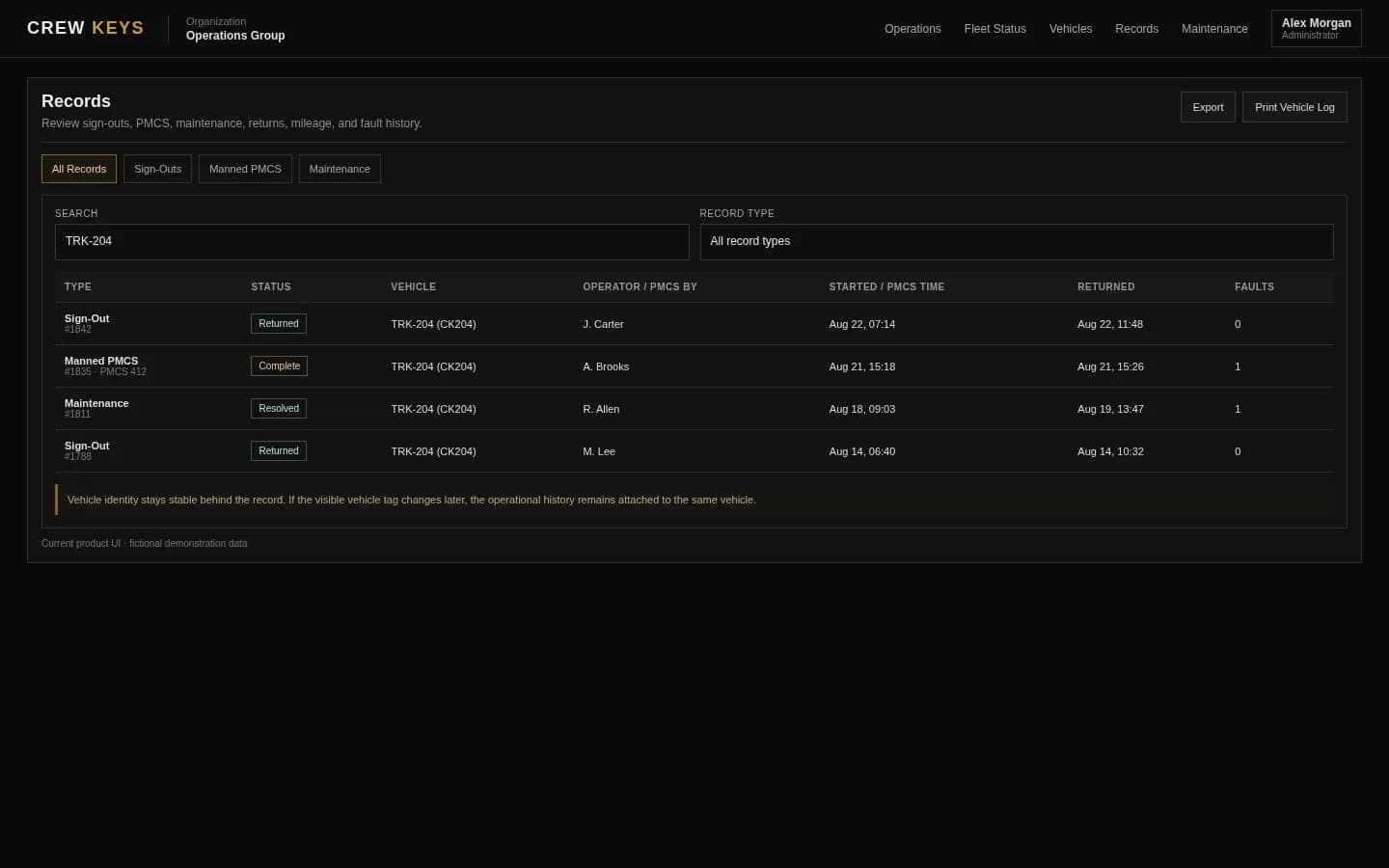
The completed inspection stays available as part of the operational record.
See operational recordsCurrent Crew Keys UI · fictional demonstration data
Who it fits
Built for teams that need more than a standalone checklist app.
Shared fleets looking for a vehicle checklist app for pre-use, condition, safety, preventive maintenance, or readiness inspections.
Teams searching for a fleet inspection checklist app that keeps findings connected to vehicle availability and maintenance decisions.
Organizations replacing paper vehicle inspection checklists, fillable PDFs, or forms that are difficult to search, reconcile, or audit later.
Operational Records
Checkout, inspections, returns, mileage, faults, and preventive maintenance stay attached to history.
| Type | Status | Vehicle | Operator / Inspected By | Started | Returned | Faults |
|---|---|---|---|---|---|---|
| Checkout | Out | TRK-204 | J. Carter | Aug 13, 18:42 | — | 0 |
| Inspection | Complete | VAN-108 | A. Brooks | Aug 13, 15:18 | Aug 13, 15:26 | 1 |
| Checkout | Returned | SUV-022 | R. Allen | Aug 13, 09:03 | Aug 13, 13:47 | 0 |
Example only · fictional records and operators
Questions
Vehicle inspection checklist app questions.
What is a vehicle checklist app?
A vehicle checklist app digitizes the inspection steps an operator completes before or during vehicle use. Crew Keys goes further by keeping checklist results connected to the vehicle, operator, mileage, faults, checkout, return, and maintenance history.
Can Crew Keys be used as a fleet inspection checklist app?
Yes. Organizations can configure vehicle inspection and preventive maintenance checklist rows, record issue details, preserve inspection history, and carry unresolved findings into the vehicle fault record.
Can Crew Keys support preventive maintenance checks?
Yes. Crew Keys supports configurable vehicle inspection and preventive maintenance checklists, with findings preserved alongside the vehicle, faults, repair documentation, and operational record.
Can inspection faults remain open after the vehicle is returned?
Yes. Findings can carry into the vehicle fault record so unresolved issues remain visible until they are addressed.
Can the vehicle inspection checklist be changed?
Administrators can manage organization-level inspection checklist rows so the operational inspection reflects the fleet process being used.
Related workflows
Follow the inspection finding into checkout, maintenance, and repair history.
Use civilian-friendly inspection language while retaining PMCS support where it applies.
Explore preventive inspections Vehicle fault trackingKeep inspection findings open until repair or resolution.
See fault tracking Vehicle checkout softwareConnect the vehicle checklist to checkout and return.
See vehicle checkout Shared vehicle managementKeep fleet inspection state visible across pooled vehicles.
Explore shared fleets Inspection and fault workflow guideTrace an inspection issue from discovery through repair documentation and historical resolution.
Follow inspection to repair Motor pool management softwareBring inspections, faults, maintenance, and availability together.
Explore motor pool operationsFounder-assisted setup
Want Crew Keys set up for your fleet?
Tell me roughly how many vehicles you manage and how you check them out today. I’ll help you import the fleet, configure the first workflow, and get your trial operating without making you figure out the setup alone.
One shared fleet record
Turn every vehicle checklist into usable fleet history.
Connect fleet inspections, preventive maintenance findings, faults, checkout records, repair documentation, and maintenance instead of collecting isolated paper or PDF checklists.
Create organization