
Free Excel vehicle booking template
Free vehicle reservation spreadsheet for company cars, trucks and vans.
Download an editable Excel vehicle booking calendar for employees sharing company vehicles. The workbook includes a vehicle roster, 200 reservation rows, start and end date/time fields, booking status, and an overlap warning for bookings of the same vehicle. No signup or macros. It is useful for a small team testing a booking process, but it cannot replace a live multi-user reservation system.
Crew Keys example
Move from a shared Excel schedule to a live company vehicle booking calendar.
The screenshot shows the actual Crew Keys reservation workspace. The downloadable spreadsheet below is a separate, editable Excel file that works without Crew Keys.
Actual Crew Keys reservation UI · fictional example bookings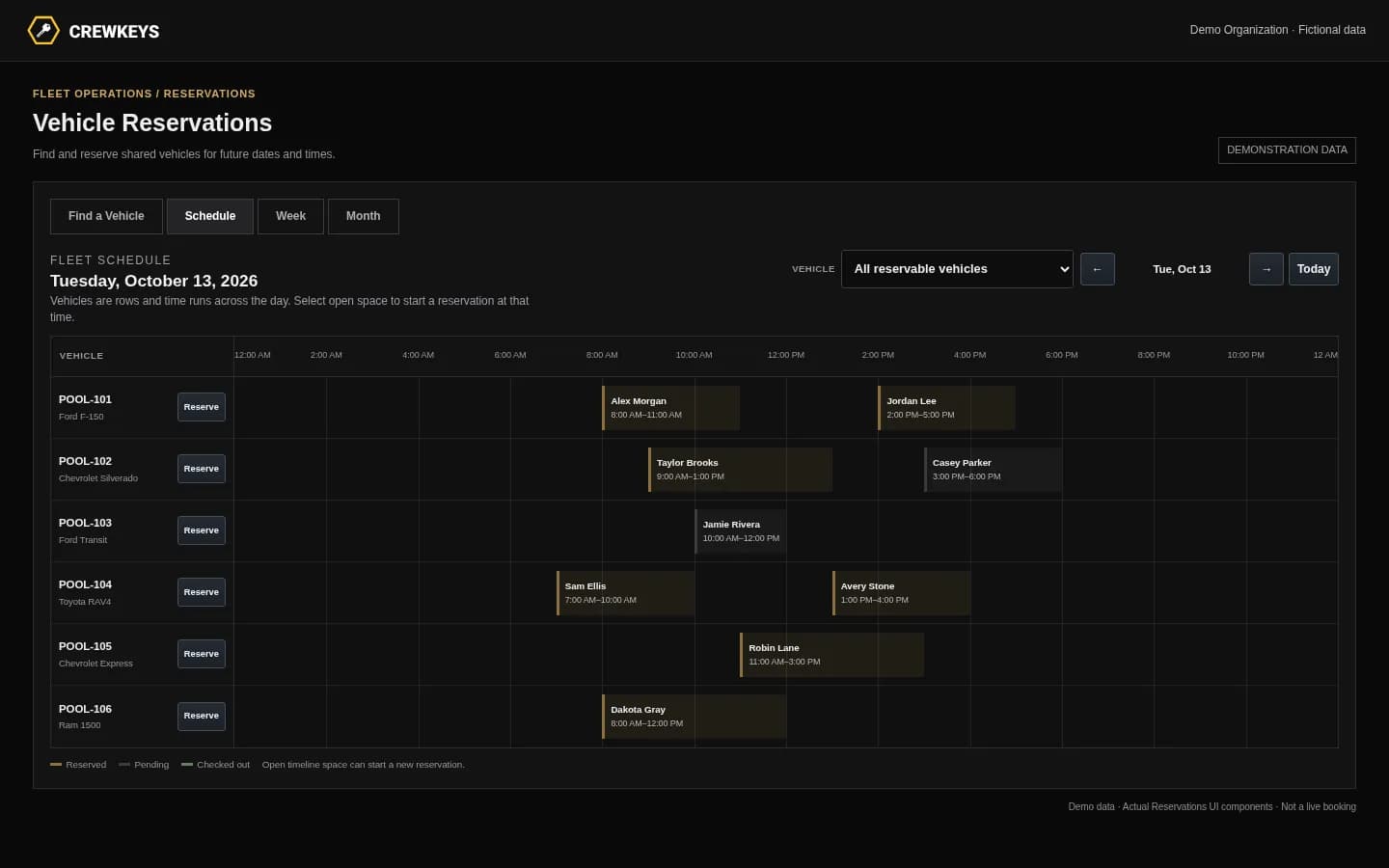
Ready-to-use Excel workbook
Download a reservation planner that checks overlapping booking times.
Start with a vehicle list, then enter one reservation per row. The workbook provides a booking-status dropdown, a vehicle selection dropdown, date/time columns and an overlap-check formula. Its example tab uses clearly fictional bookings, while the actual Reservations tab starts blank.
Excel recalculates the warnings when you open and edit the workbook. A copy saved on someone else's computer is not linked to yours, so staff must still coordinate who is responsible for updating the master file.
Example only · fictional vehicle bookings
What should a shared vehicle booking spreadsheet look like?
Each line holds one booking with an exact start and end. In this illustration, two requests for CAR-01 overlap between 11 a.m. and noon. The workbook marks both as CONFLICT. VAN-02 remains CLEAR because it is a different vehicle.
| Vehicle | Reserved by | Start | End | Status | Overlap check |
|---|---|---|---|---|---|
| CAR-01 | A. Manager | Nov 10 · 9 AM | Nov 10 · Noon | Booked | CONFLICT |
| CAR-01 | B. Coordinator | Nov 10 · 11 AM | Nov 10 · 2 PM | Tentative | CONFLICT |
| VAN-02 | C. Operator | Nov 10 · 9 AM | Nov 10 · Noon | Booked | CLEAR |
Included fields
What's inside the company vehicle reservation workbook?
The template separates vehicles from bookings so the same unit is not entered under different names. It also keeps a real driver's name optional because a reservation is only a plan.
| Field | Why it matters |
|---|---|
| Vehicle ID | One consistent code for each car, van or truck. Add these to the Vehicles tab first. |
| Reserved by | Name of the employee placing the reservation. They may not ultimately be the driver. |
| Actual driver (optional) | A planning note, not verification of physical custody. |
| Start / End | Date and time window. Both are required for the overlap formula to work. |
| Status | Booked, Tentative or Cancelled. Cancelled bookings are ignored by conflict checking. |
| Overlap Check | Excel formula displays CLEAR, CONFLICT or CHECK DATES based on rows in this one file. |
| Purpose / destination | Optional trip context the team can refer to when reviewing a request. |
Set it up in minutes
How do employees reserve a company vehicle in Excel?
- List each vehicle. Add a unique unit or tag ID on the Vehicles tab. Use the same ID for every booking.
- Record the requested window. On Reservations, select the vehicle and enter the beginning and ending date and time—not just the date.
- Check the warning. CONFLICT means another active booking for that vehicle overlaps; CHECK DATES means the end is not after the start.
- Resolve conflicts before confirming. Change a time or vehicle, or mark a cancelled request Cancelled. Recheck the warning in Excel.
- Decide who owns the file. Assign a coordinator to update a single shared workbook and communicate late returns or vehicle changes outside the spreadsheet.
Important limitations
When does an Excel vehicle booking calendar stop working?
If separate staff members save or email different workbook copies, each formula can report CLEAR even when another employee has booked the same vehicle elsewhere. A reservation may also be valid on paper while the vehicle is still checked out, under inspection, or unavailable.
A booking calendar records intended use; a vehicle checkout record identifies the operator who actually took custody. Organizations can use one or both workflows depending on their process.
For multiple sites, approval rules, changing vehicle readiness and real-time conflict prevention, a dedicated company vehicle reservation system offers controls that a spreadsheet alone cannot enforce.
Continue reading
Related Crew Keys workflows and resources.
See how a live schedule handles booking rules, approvals, current availability and conflicts.
Explore Company vehicle reservation software Fleet vehicle availabilityUnderstand the difference between a free calendar slot and a vehicle that is ready right now.
See fleet availability Shared company vehicle managementUnderstand availability and recorded custody beyond a reservation-only calendar.
Explore shared fleets Vehicle sign-out log templateDownload a separate paper or Excel log for actual checkouts and returns.
Get the sign-out template More free fleet resourcesBrowse practical templates, examples and implementation guides.
Browse fleet resourcesFrom template to workflow
When multiple people need the same vehicle, move beyond file copies.
Crew Keys can manage future vehicle reservations without a shared Excel file and can separately record who actually checked out and returned the vehicle. Neither workflow requires GPS hardware.