
Vehicle reservation software
Pool vehicle booking and reservation software for shared fleets.
A pool vehicle booking system solves a different problem from a vehicle sign-out sheet: it shows who needs a shared car, van or truck in the future, not just who has one right now. Crew Keys lets operators search availability for a date and time, request approval when needed, manage upcoming reservations, and then complete the separate vehicle checkout and return when the trip takes place.
30-day full-product trial · No card required. Explore reservations, approvals and checkouts with your fleet. Prefer guided setup? Contact the creator →
Current product UI
See which vehicles are booked, and when.
The reservation schedule brings vehicles and booked time windows into the same view. Operators can switch between day, week, and month views instead of searching separate calendars.
Current Crew Keys UI · fictional demonstration data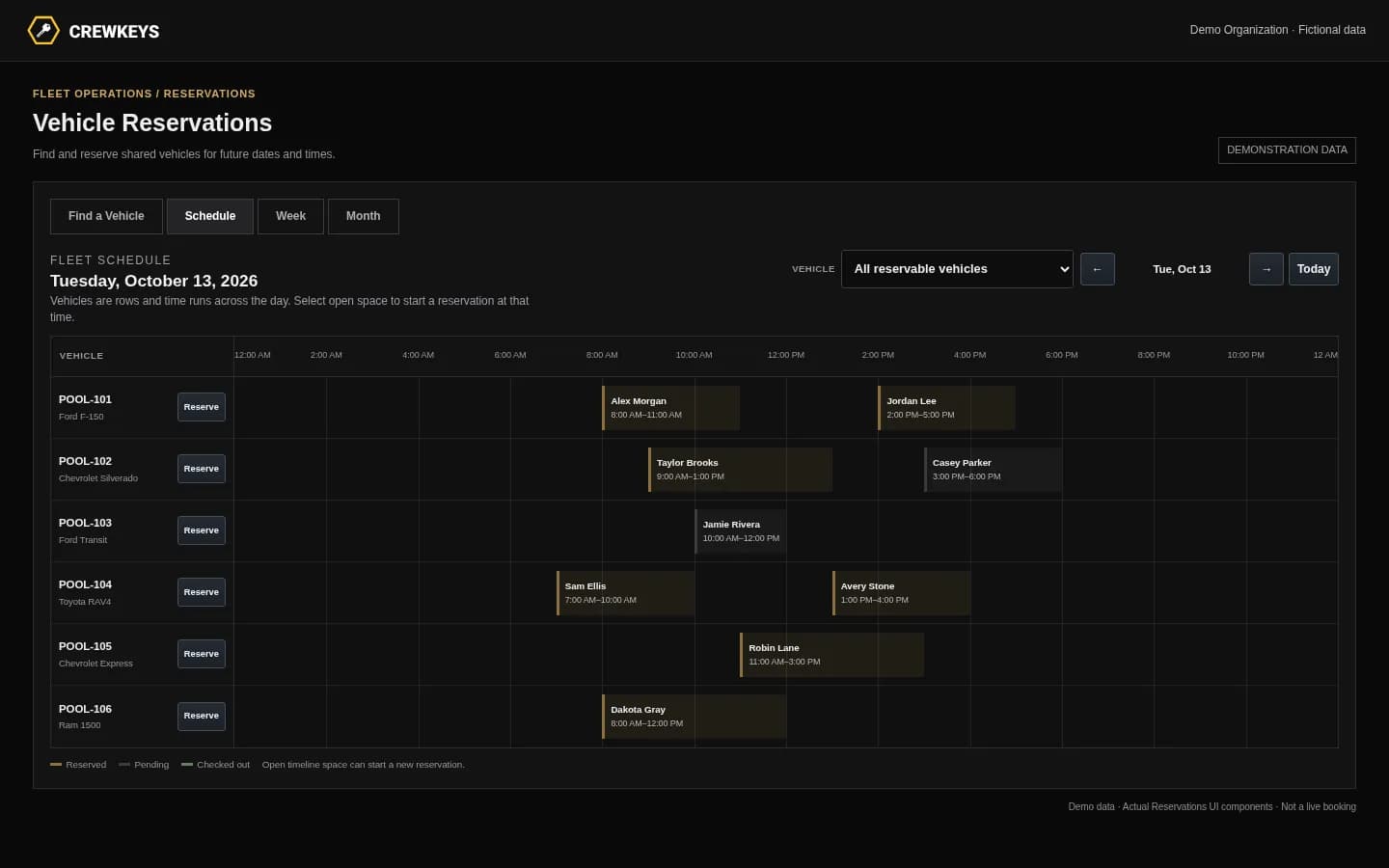
Mobile workflow
Check upcoming vehicle bookings from a phone.
Members can search a future time window and review the day schedule in the same mobile browser they use for vehicle checkout. Booking is not limited to a desktop dispatcher.
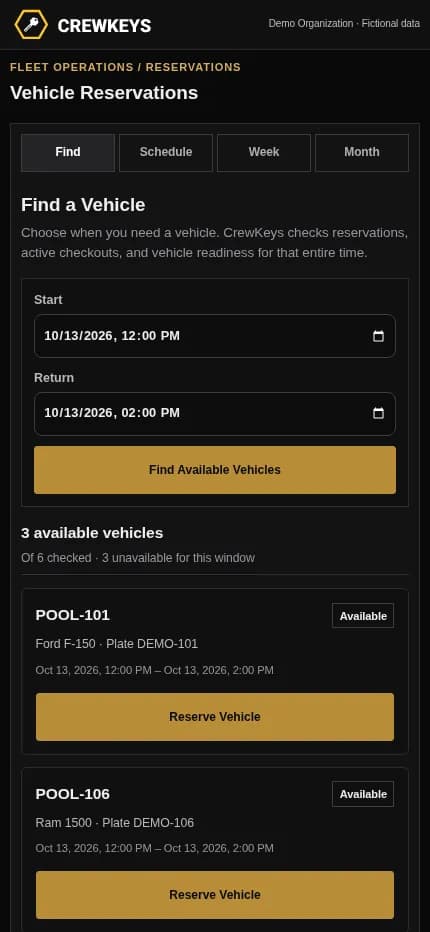
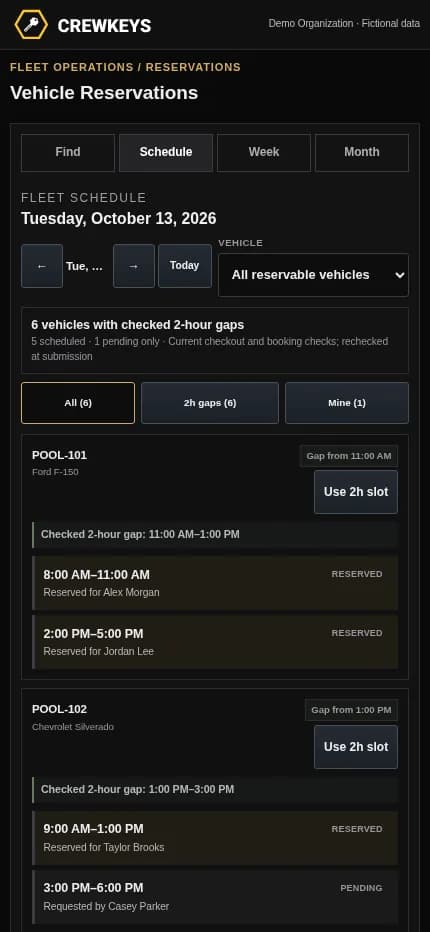
Current responsive Crew Keys UI · fictional demonstration data
What it solves
Avoid finding out a shared vehicle is already spoken for.
Search the time you actually need
Choose a start and end time. The availability finder checks existing reservations, active checkouts, and vehicle readiness for that window.
Control who can reserve which vehicles
Administrators decide whether each vehicle allows automatic booking, needs approval, or cannot be reserved. Reservation notice and duration rules can be configured for the organization.
See bookings in context
Switch between a time-based day schedule, seven-day view, and month calendar. Administrators can also review reservation history separately.
Keep checkout separate from booking
A reservation does not mark a vehicle as checked out. When the operator takes the vehicle, the normal checkout and any required inspection still happen.
Fleet Availability
See what can leave now and why other vehicles cannot.
Available
7
Ready now
Out
3
Checked out
Maintenance
2
Out of service
| Tag | Make Model | Status | Who | Location |
|---|---|---|---|---|
| TRK-204 | Ford F-250 | Out | J. Carter | North Yard |
| VAN-117 | Ford Transit | Pending | M. Lewis | Inspection in progress |
| SUV-031 | Chevrolet Tahoe | Maintenance | — | Brake inspection |
Example only · fictional vehicles and operators
Workflow
How reserving a shared vehicle works in Crew Keys.
- 01
Choose a date and time
For example, an operator needs a pool pickup from 8 a.m. to noon next Tuesday. They search that window rather than relying on what is available today.
- 02
Select a reservable vehicle
Crew Keys checks the selected window against approved bookings, active custody, and vehicle restrictions. A vehicle requiring approval is labeled accordingly.
- 03
Confirm or request approval
Automatic reservations can be approved immediately when eligible. Approval-required vehicles generate a request for an administrator to review.
- 04
Check out and return the vehicle
As the booking approaches, protected checkout rules help prevent another operator from taking the vehicle. The reserved operator still completes checkout, inspection if required, and return.
Active Checkout
Operator, trip, mileage, fuel, and vehicle stay on one operational record.
| Vehicle | Operator | Out | Beg Miles | Fuel | Purpose | Destination |
|---|---|---|---|---|---|---|
| TRK-204 Ford F-250 | J. Carter | Aug 13, 18:42 | 64,118 | 3/4 | Equipment run | North Yard |
Example only · fictional checkout data
Connected product views
A future booking connects to daily vehicle operations.
Explore availability for a future booking window, then see how checkout and return record the actual vehicle handoff.
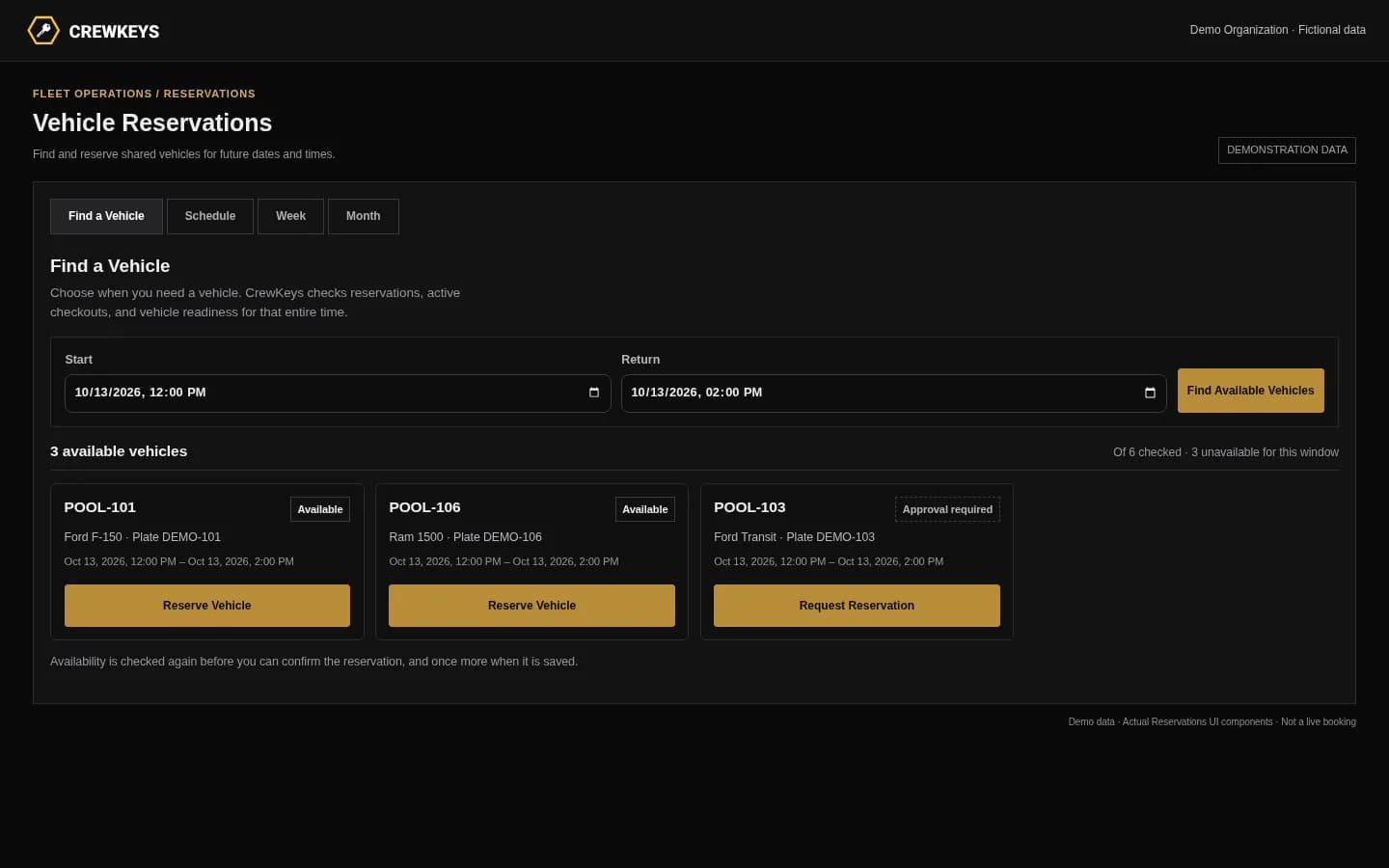
Check the requested time before reserving.
Crew Keys checks existing reservations, active checkouts, and vehicle readiness before offering a booking. Availability is checked again when the request is submitted.
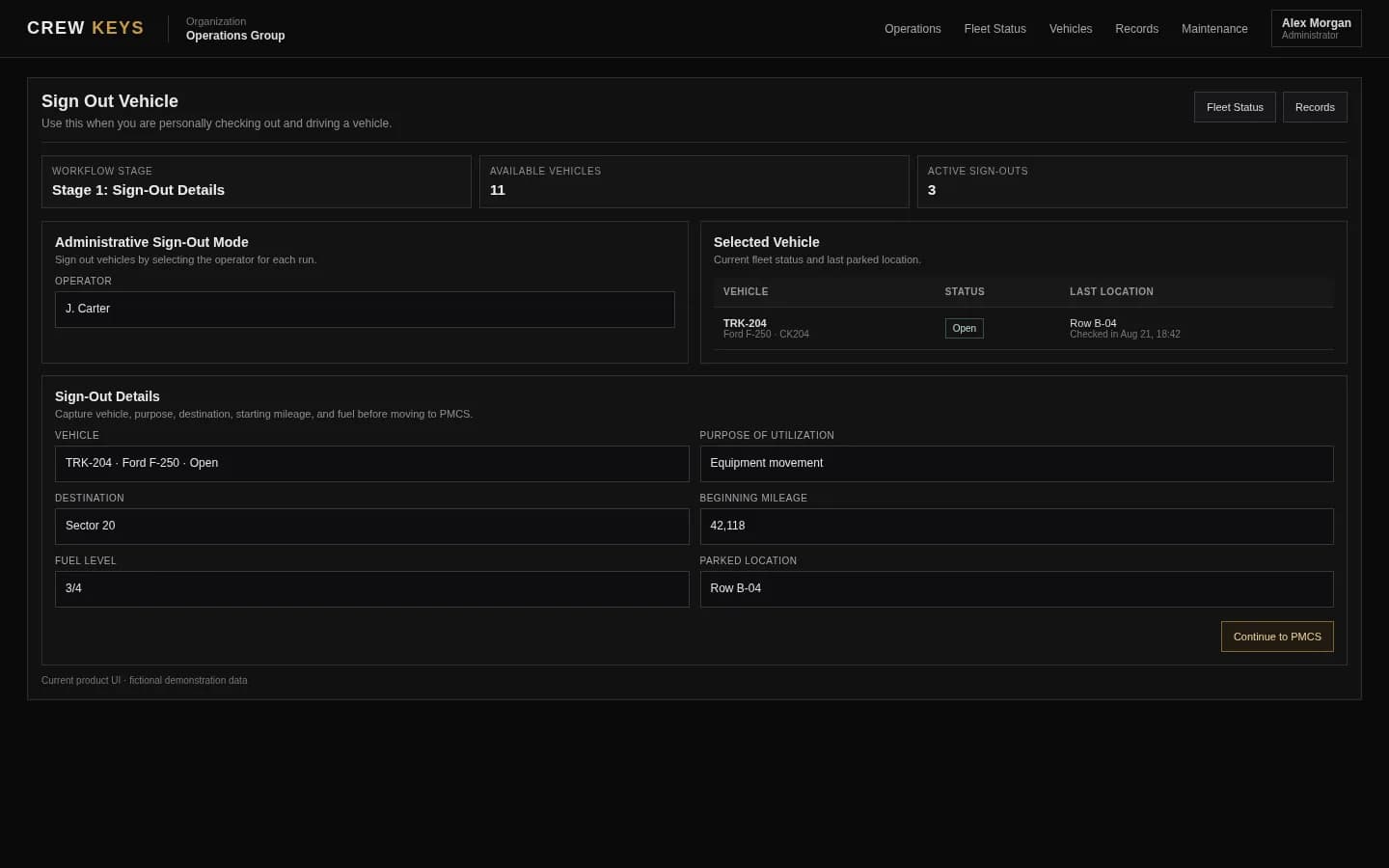
A reservation is a plan. Checkout records the actual handoff.
See vehicle checkout
Close the trip and make the vehicle available again.
See vehicle returnCurrent Crew Keys UI · fictional demonstration data
Who it fits
For teams whose vehicles need to be shared across people and days.
Companies with a common pool of cars, pickups, vans, or other vehicles that employees need to book in advance.
Motor pools and shared fleet desks coordinating several operators and future vehicle requests.
Administrators who need to review bookings, reserve on behalf of roster members, and keep reservation history separate from actual vehicle custody.
Operational Records
Checkout, inspections, returns, mileage, faults, and preventive maintenance stay attached to history.
| Type | Status | Vehicle | Operator / Inspected By | Started | Returned | Faults |
|---|---|---|---|---|---|---|
| Checkout | Out | TRK-204 | J. Carter | Aug 13, 18:42 | — | 0 |
| Inspection | Complete | VAN-108 | A. Brooks | Aug 13, 15:18 | Aug 13, 15:26 | 1 |
| Checkout | Returned | SUV-022 | R. Allen | Aug 13, 09:03 | Aug 13, 13:47 | 0 |
Example only · fictional records and operators
Questions
Practical questions about shared vehicle reservations.
Can two people reserve the same vehicle at overlapping times?
Approved reservations block overlapping bookings for the same vehicle. Crew Keys checks availability while the operator selects a vehicle and checks again when the reservation is submitted.
Does every reservation require administrator approval?
No. Each vehicle can be configured for automatic reservations, approval-required requests, or reservations disabled. Organization-wide notice, advance-booking, and duration limits also apply.
What should shared fleet software for pool vehicle reservations include?
Look for future time-window availability, conflict prevention, rules for who may reserve which vehicles, optional approvals, a schedule people can understand on mobile, cancellation controls, and a separate check-out and return record. Crew Keys supports these reservation and custody workflows without GPS tracking.
Can an administrator reserve a vehicle for another employee?
Yes. An administrator with the appropriate operations permission can create a reservation on behalf of an active roster member.
Does reserving a vehicle count as checking it out?
No. A reservation holds a future time window; checkout records when a specific operator actually takes custody. Inspection requirements and return details still apply.
Can a member cancel a booking?
Members can cancel their own eligible pending or approved reservations while the reservation window has not ended. Administrators can manage applicable requests and review the reservation log.
What if someone tries to check out a vehicle before another person’s booking?
Crew Keys applies a configurable protected window before an approved reservation. For an earlier checkout, an upcoming booking can require an expected return time that does not overlap the next reservation. The software cannot physically prevent an overdue return.
Do operators need GPS tracking or a key cabinet?
No. Crew Keys manages booking, checkout, and return through a web-based fleet record. It does not require GPS hardware or electronically controlled keys.
Related workflows
See what happens before and after a booking.
A reservation covers a future window; the fleet status view shows current operational availability.
See fleet availability Vehicle checkout and custodySee what the operator records when a reserved vehicle is actually taken.
See vehicle checkout Motor pool managementUnderstand how booking fits into everyday shared-vehicle operations.
Explore motor pool operations Company pool vehicle operationsSee how employee-shared company vehicles use reservations alongside actual checkout and return.
Explore company vehicle pools Return and check-inClose actual vehicle custody with mileage, fuel, parked location, and return notes.
See vehicle returnFounder-assisted setup
Want Crew Keys set up for your fleet?
Tell me roughly how many vehicles you manage and how you check them out today. I’ll help you import the fleet, configure the first workflow, and get your trial operating without making you figure out the setup alone.
One shared fleet record
Schedule vehicle use without losing track of the handoff.
Manage future vehicle bookings alongside live availability, operator checkout, inspections, return details, and the records that stay with the vehicle.
30-day full-product trial · No card required. Ask the creator about setup →