
Fleet maintenance tracking
Fleet maintenance tracking connected to the vehicles people actually use.
Crew Keys keeps maintenance status, service mileage, open faults, repair notes, operational availability, and vehicle history in the same system used for checkout and return. Teams can move a vehicle into maintenance without maintaining a separate availability or maintenance spreadsheet.
Current product UI
Maintenance state belongs on the same vehicle record as daily operations.
A vehicle placed in maintenance stays unavailable to normal checkout while service mileage, notes, faults, and the eventual return-to-service record remain connected.
Current Crew Keys UI · fictional demonstration data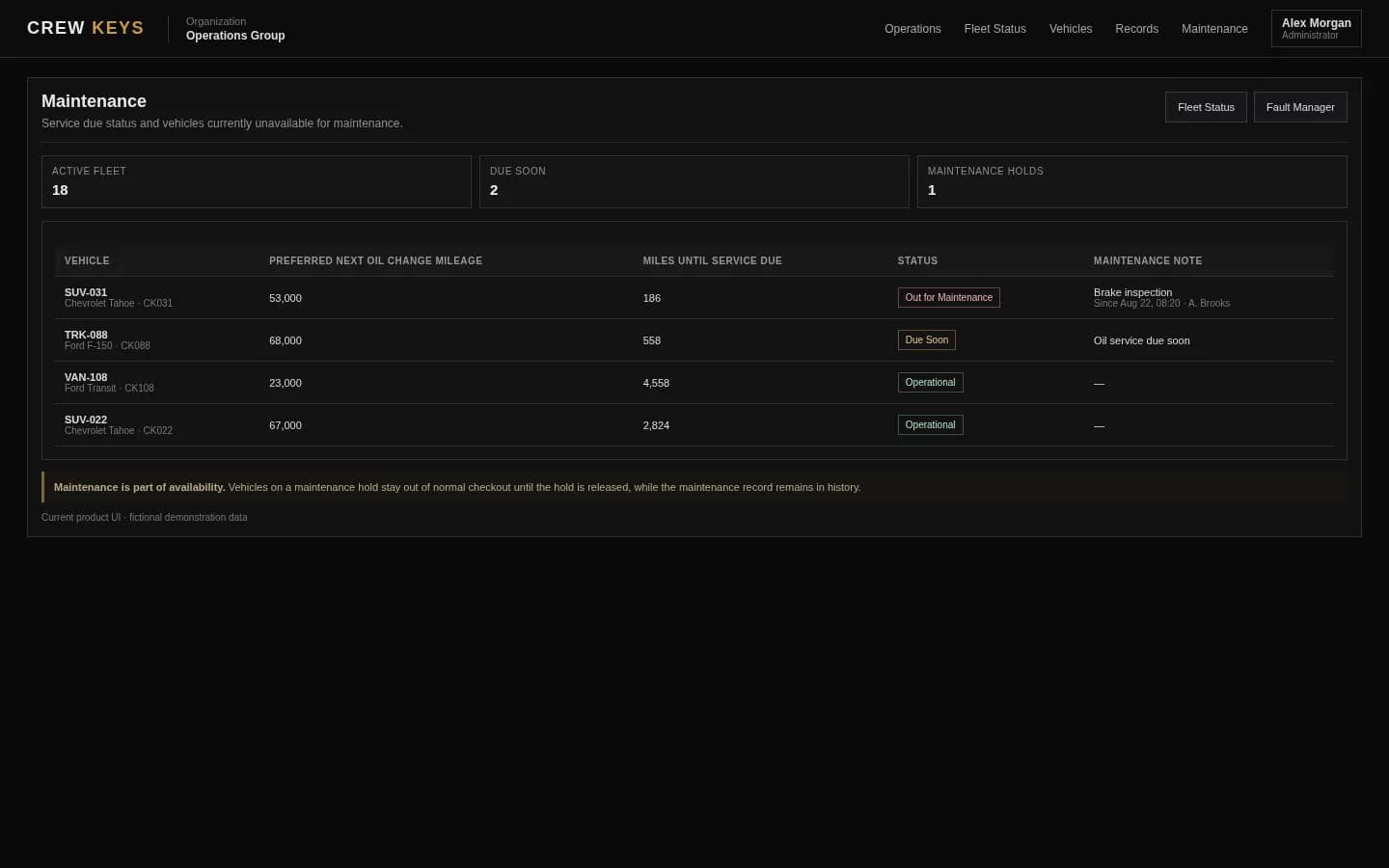
What it solves
Fleet maintenance record keeping without another disconnected spreadsheet.
Current maintenance status
See which vehicles are unavailable for maintenance, overdue, due soon, or missing a maintenance plan while preserving who initiated the maintenance action.
Mileage and date-based service tracking
Keep current mileage, oil-change targets, general-service targets, and due status on the vehicle record instead of maintaining a separate reminder sheet.
Fleet maintenance record keeping
Preserve maintenance history, fault context, repair notes, mileage, and return-to-service details so managers can review what happened without reconstructing old spreadsheets or paper records.
Maintenance Posture
Keep out-of-service vehicles and repair history visible to administrators.
| Vehicle | Status | Reason | Started | Mileage | Repair State |
|---|---|---|---|---|---|
| SUV-031 | Out of Service | Brake inspection | Aug 12 | 52,814 | Awaiting repair |
| TRK-088 | Operational | Oil service | Aug 05 | 67,442 | Completed |
Example only · fictional maintenance data
Workflow
How a vehicle moves through maintenance in Crew Keys.
- 01
Identify the maintenance need
Use service mileage, a service date, an open fault, or an operational decision to move the vehicle out of normal availability.
- 02
Place the vehicle in maintenance
The vehicle is held unavailable so another operator does not treat it as ready for checkout.
- 03
Document service context
Keep maintenance notes, mileage, service targets, and related vehicle issues together.
- 04
Return the vehicle to service
Record ending mileage and parked location as appropriate, then restore the vehicle to the available fleet while retaining the maintenance record.
Open Vehicle Faults
Inspection findings remain visible until they are repaired or resolved.
| Vehicle | Fault | Status | Source | Reported |
|---|---|---|---|---|
| VAN-117 | Passenger mirror cracked | Open | Inspection | Aug 13 |
| SUV-031 | Brake inspection required | Maintenance | Return | Aug 12 |
Example only · fictional fault data
Connected product views
See the operational context around maintenance.
Maintenance is connected to the problems that caused it and the records that document what happened to the vehicle.
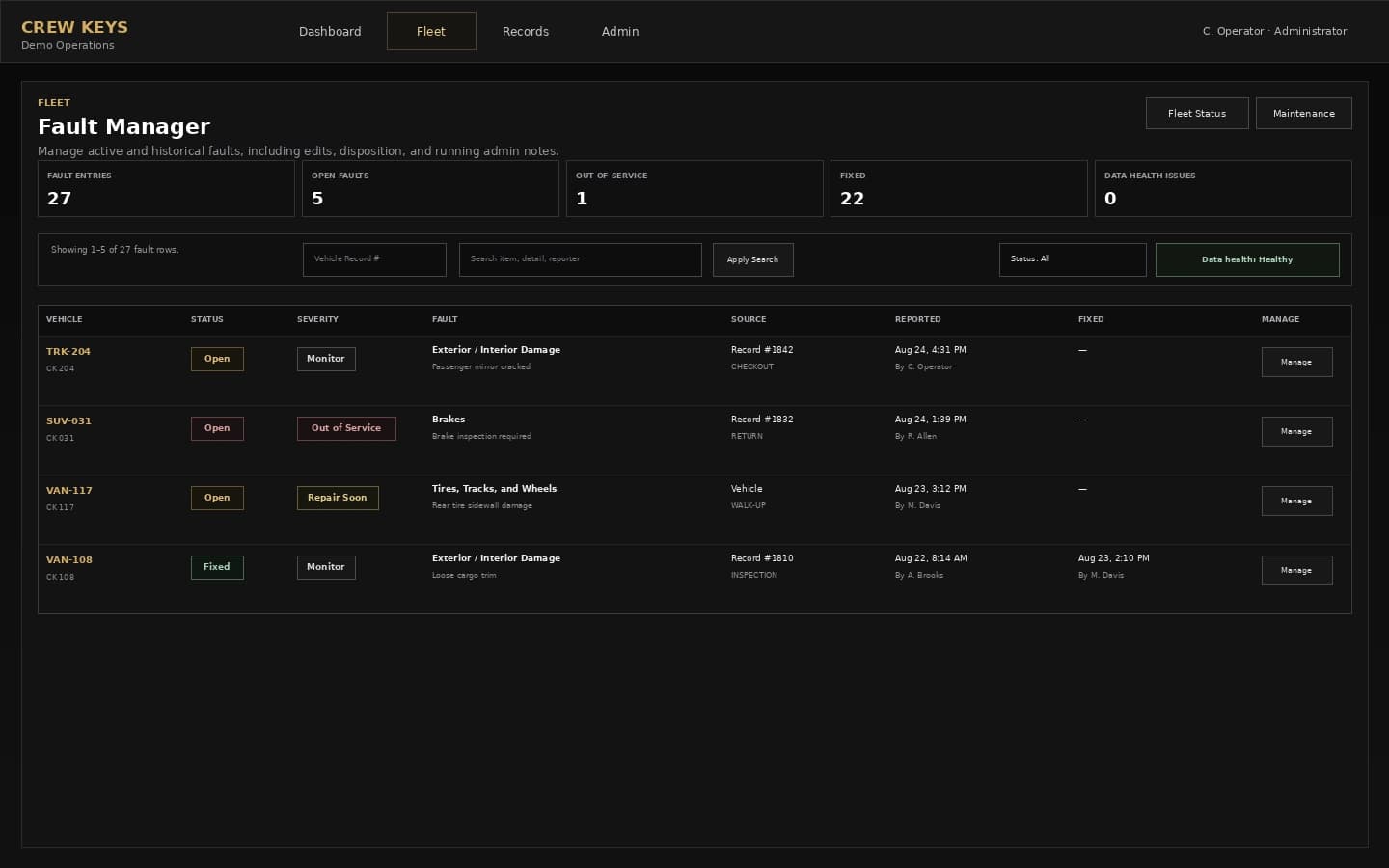
Open problems stay visible before and during maintenance follow-through.
See fault tracking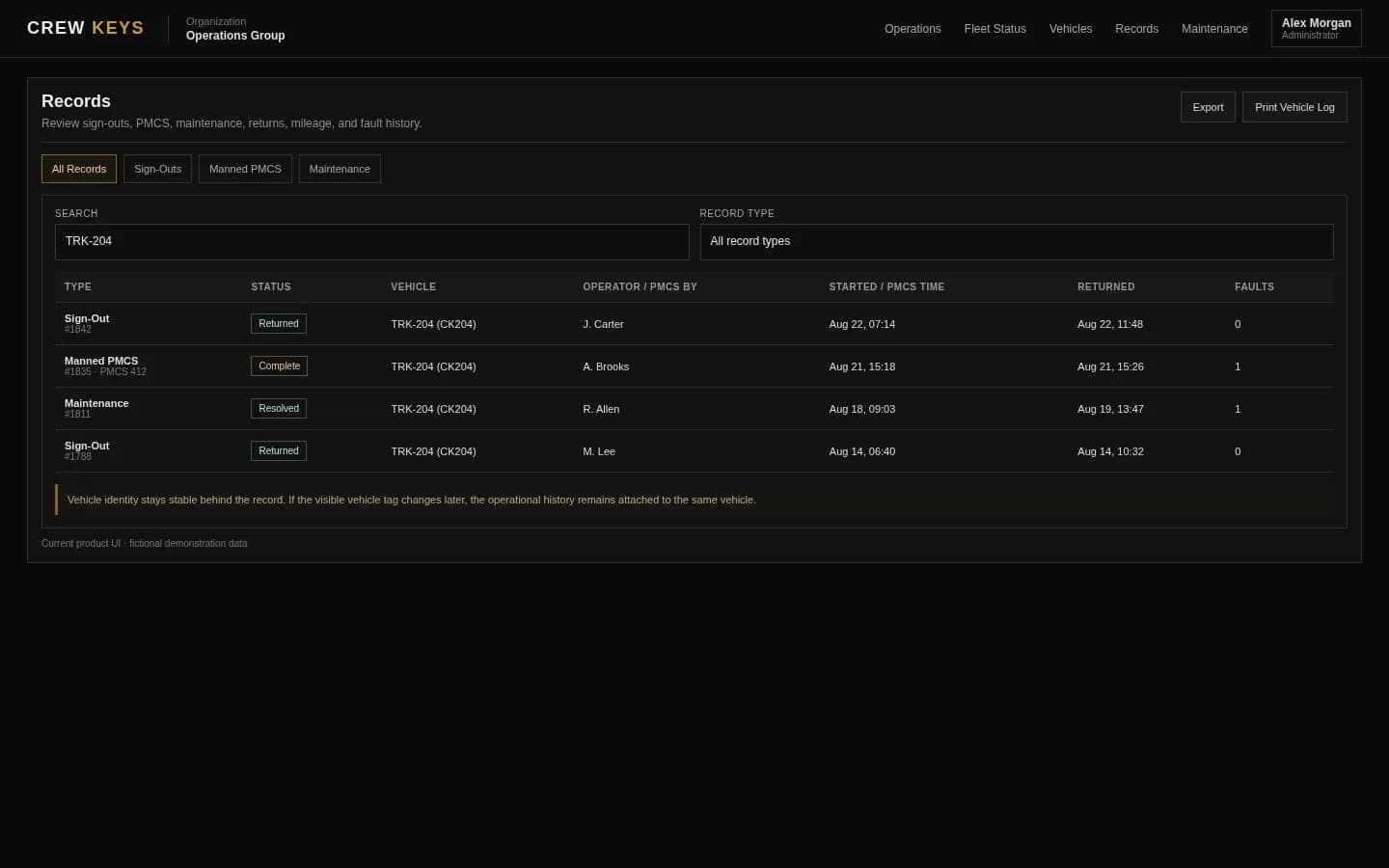
Service activity remains part of the vehicle history after return to service.
See operational recordsCurrent Crew Keys UI · fictional demonstration data
Who it fits
For small and midsize fleets that need operational maintenance visibility.
Shared fleets that need maintenance status, service targets, and repair history without deploying a heavy CMMS.
Fleet managers who need service decisions to immediately affect checkout availability.
Teams replacing maintenance tabs, spreadsheets, whiteboards, and paper records that are disconnected from driver checkout history.
Questions
Fleet maintenance tracking questions.
Is Crew Keys a fleet maintenance tracking system?
Crew Keys includes operational maintenance tracking for shared fleets, including maintenance status, mileage and date-based service targets, notes, faults, availability, and vehicle history.
How does Crew Keys handle fleet maintenance record keeping?
Crew Keys keeps maintenance status, service targets, mileage, fault context, repair notes, completed maintenance history, and return-to-service details attached to the vehicle record used for daily operations.
Can Crew Keys track upcoming or overdue maintenance?
Yes. Maintenance planning can use mileage targets, date targets, or both, with current, due-soon, overdue, maintenance-hold, and unplanned states visible to fleet managers.
Can a vehicle be blocked from checkout while in maintenance?
Yes. A vehicle placed in maintenance remains unavailable for normal checkout until it is returned to service.
Can maintenance history stay tied to the vehicle?
Yes. Maintenance records remain part of the vehicle history alongside checkout, inspections, faults, mileage, and returns.
Does Crew Keys replace a full CMMS?
Crew Keys is focused on shared-vehicle operations and practical fleet maintenance visibility. Organizations needing complex parts inventory, work-order labor costing, or advanced shop management may still use a dedicated CMMS alongside it.
Related workflows
Keep exploring Crew Keys.
See how a 35-vehicle government fleet with 119 eligible operators replaced manual records and processed more than 2,000 digital checkouts.
Explore Real government fleet case study Vehicle fault trackingCarry reported problems into maintenance action and resolution.
See fault tracking Fleet vehicle availabilityReflect maintenance state on the live fleet board.
See fleet availability Vehicle return and check-inCapture the condition and mileage that can trigger follow-up maintenance.
See vehicle return Motor pool managementSee the full operational workflow around maintenance.
Explore motor pool operationsFounder-assisted setup
Want Crew Keys set up for your fleet?
Tell me roughly how many vehicles you manage and how you check them out today. I’ll help you import the fleet, configure the first workflow, and get your trial operating without making you figure out the setup alone.
One shared fleet record
Keep maintenance decisions visible to the people dispatching vehicles.
Tie service status, mileage, faults, repair notes, return-to-service details, and vehicle availability together without requiring a full enterprise maintenance platform.
Create organization