
Real government fleet case study
How a 35-vehicle government fleet replaced paper records with one shared operational view.
A government organization managing 35 shared vehicles moved from front-desk sign-out logs, dispatch paperwork, maintenance sheets, and binders to Crew Keys. The fleet was operational within hours and fully digital by day two.
Government fleet software / Operational fit
What does government fleet management software need to handle for shared vehicles?
Departments managing a common motor pool often need more than an inventory spreadsheet, but not every fleet requires GPS tracking. This case study shows the shared-vehicle accountability work Crew Keys handles: who took each vehicle, current availability, inspection findings, maintenance status, and the completed return.
Vehicle custody: record the authorized operator, checkout and return in one searchable history.
Readiness: show which vehicles are available, being inspected, in maintenance, or out of service before another operator selects one.
Records: keep mileage, faults, repair notes, service visibility and operating history linked to the same vehicle.
Scope: Crew Keys handles shared-fleet operations and vehicle accountability, not live GPS or a full government procurement and asset-management suite.
The old process
The fleet record lived in binders.
Before Crew Keys, an operator signed a vehicle out at the front desk, completed dispatch paperwork, performed the required maintenance checks, and then departed. The front desk kept separate vehicle sign-out logs and maintenance sheets in binders.
The process could document an individual handoff, but it was difficult to maintain a current picture of the entire fleet. Windshield replacements, oil changes, registrations, tires, air-conditioning problems, mileage, missing keys, and other issues were spread across paper records, conversations, and memory.
The management problem
The information often existed somewhere. Finding and trusting it was the problem.
Maintenance: a problem could be written on a maintenance sheet and turned in, but managers did not have a simple way to know later whether it was fixed, still pending, or simply forgotten.
Mileage: determining which vehicles were approaching an oil change could require reviewing old records and physically checking vehicles to verify the current mileage.
Registrations: personnel had to look through records and visually verify dates to find registrations that were expired or approaching expiration.
Custody: missing keys could trigger phone calls and uncertainty about who last had the vehicle.
Location: even an available vehicle could take time to find when nobody knew exactly where it had been parked.
A measurable manual burden
Physical verification alone represented at least 14.5 staff-hours per month.
The fleet previously performed recurring physical vehicle verification at roughly 25 minutes per vehicle. Across 35 vehicles, that is approximately 14.5 staff-hours for one fleet-wide pass. More than one person could help finish sooner, but the underlying verification work still had to be performed.
Crew Keys does not eliminate physical inspections when an inspection is actually required. It reduces the need to walk the fleet simply because records are scattered or stale. Preserved mileage, custody, fault, registration, maintenance, and parked-location data make routine verification available from the record first.
Rollout
Imported in hours. Fully digital by day two.
The organization imported its existing fleet information rather than rebuilding the roster one vehicle at a time. The old binder process stayed available for the first day as a fallback. By the second day, the organization had moved fully digital.
- 01
Import the existing fleet
Vehicle information already maintained by the organization was brought into Crew Keys instead of being manually recreated.
- 02
Use existing phones
No GPS units, tablets, scanners, electronic key cabinets, or other specialized hardware were required.
- 03
Run one day in parallel
The paper process remained available during the first day while operators began using Crew Keys.
- 04
Move fully digital
By day two, normal vehicle checkout and accountability had moved into Crew Keys.
What operators do now
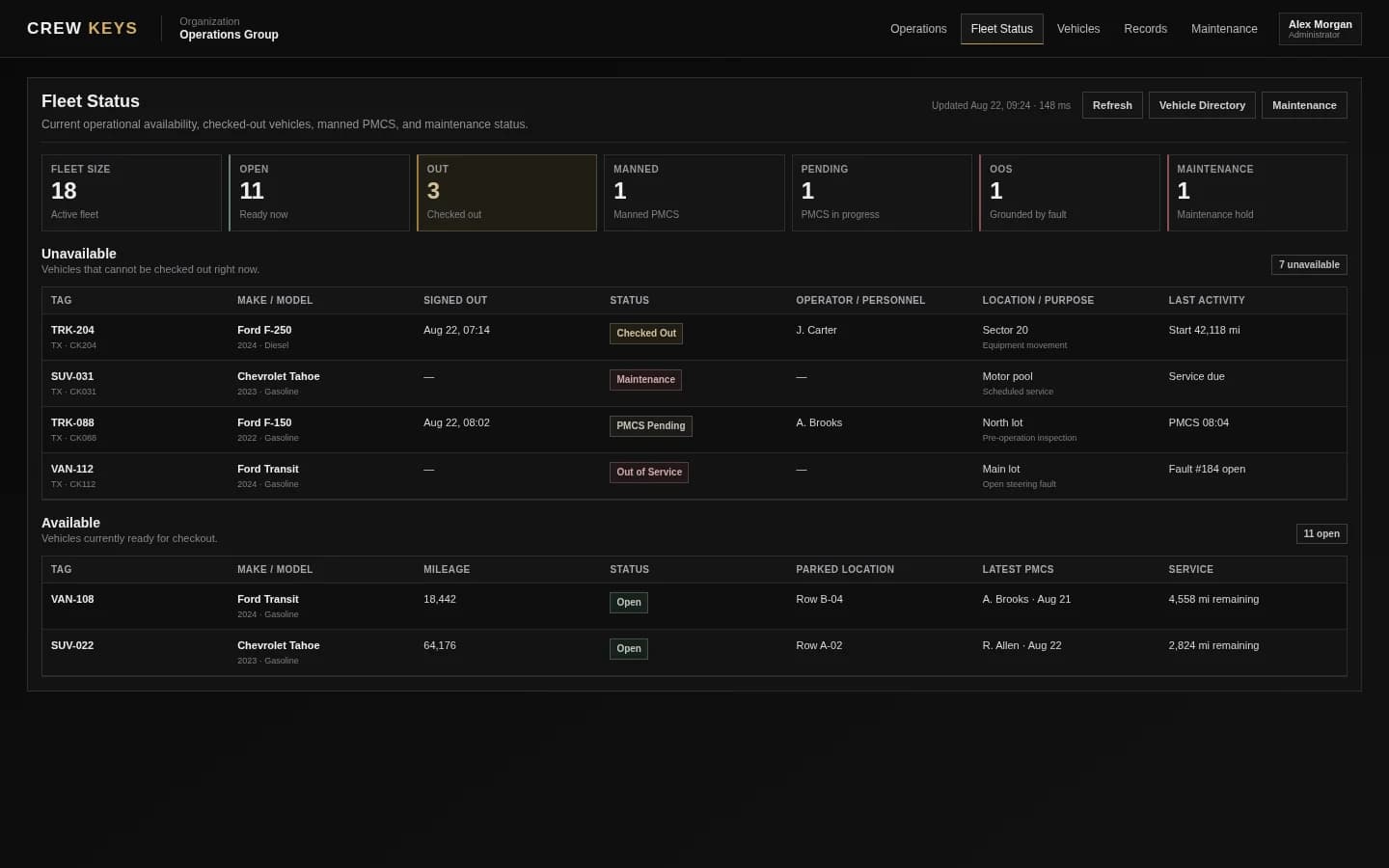
Open the app, choose an available vehicle, complete the checklist, and go.
Operators use the phones they already carry. They select from the available vehicle pool, complete the organization's custom maintenance checklist, and finish checkout. On return they record fuel level, ending mileage, and where the vehicle was parked.

Less paperwork at the handoff.
Operators complete the workflow from their phones instead of filling out multiple forms and moving back and forth between paper steps.

The next operator can find the vehicle.
Parked location became an unexpectedly valuable time-saver because the next person does not have to search the lot or ask where an available vehicle was left.
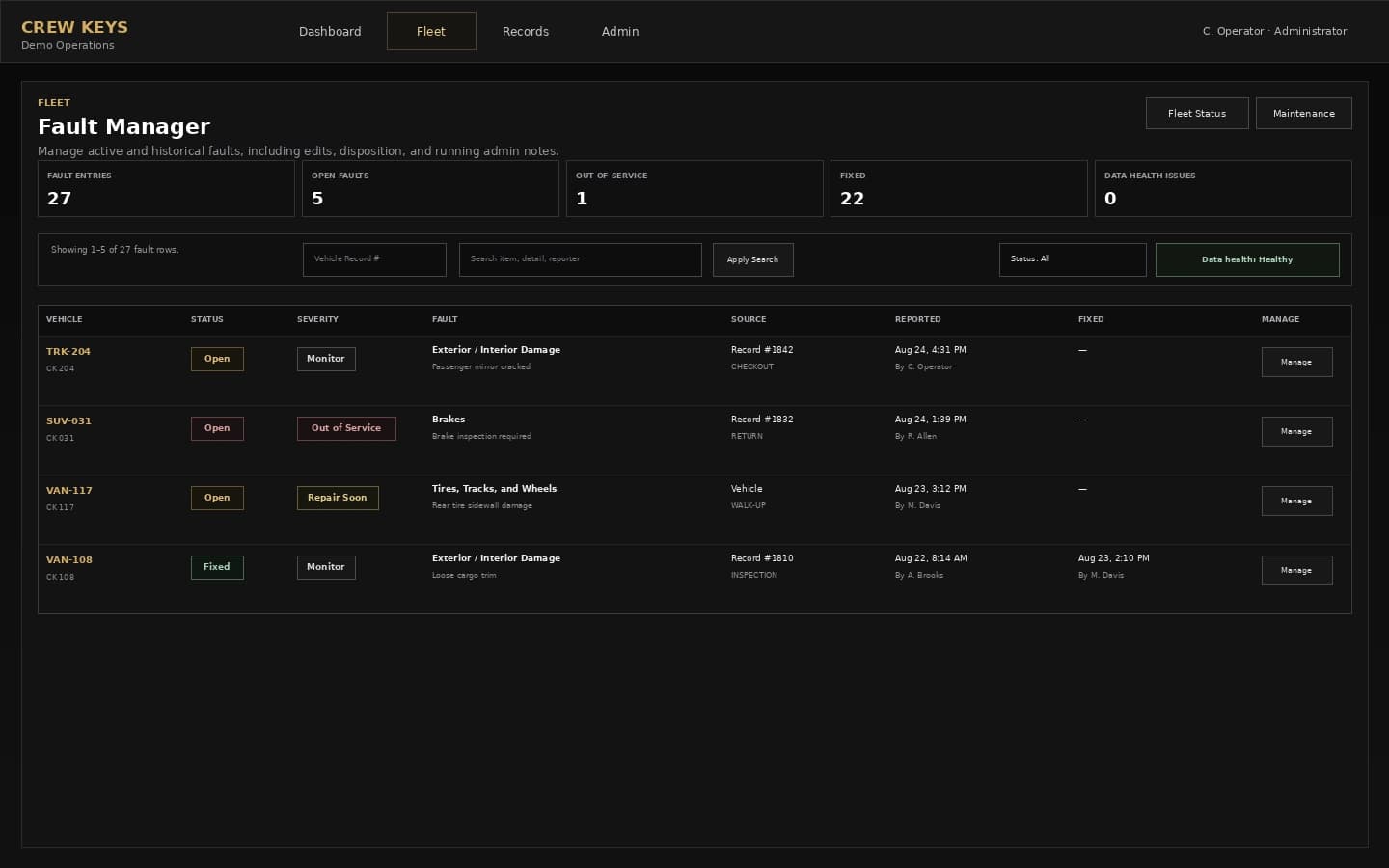
Current Crew Keys UI shown with fictional demonstration data. Case-study operating metrics are from the real fleet described here.
Fault visibility
Repeated reports stopped looking like isolated comments.
In one example, an operator reported that the tires on a van were getting low. Then another operator reported it. Then another. With the reports visible together on the same vehicle, the pattern became clear enough to show that the van had a real issue requiring attention.
Maintenance visibility
The system can surface what is coming due instead of making the manager search for it.
Crew Keys dashboard information gives managers visibility into upcoming or overdue oil changes and registrations approaching expiration or already expired. Previously, finding the same answers could require reviewing records one by one and physically verifying that old data was still accurate.
Mileage
Managers can see the recorded mileage history instead of beginning with a physical odometer check.
Maintenance
Upcoming and past-due service can be surfaced for attention instead of rediscovered from paper.
Registration
Approaching or expired registration dates can be identified without visually searching every vehicle and binder.
Custody accountability
When keys went missing, the fleet could start with the record instead of speculation.
During a key audit, managers identified keys that were missing or had never been returned. Crew Keys showed who had those vehicles most recently. Managers contacted the last operators, and the keys were brought back.
Before: answering who had a vehicle last could mean multiple calls, different recollections, and sometimes finger-pointing.
Now: authorized managers can start with the preserved custody record and work from the same information.
Remote access: multiple managers and admins can review fleet status, faults, and mileage even when they are away from the front desk or vehicle lot.
What changed for the organization
The fleet record stopped depending on one front desk and piles of paper.
For operators
Less paperwork, easier maintenance checks because previous faults stay visible, and a parked location that makes the next vehicle easier to find.
For managers
Fleet status, faults, mileage, maintenance requirements, custody, and history are available together instead of reconstructed from separate records.
For the organization
Multiple authorized managers and administrators can see the same operational picture rather than relying on one person to be the keeper of the fleet record.
A necessary condition
The record is only as current as operator participation.
Crew Keys does not automatically know what happened to a vehicle. Operators still have to complete the checkout and return workflow. For this organization, the low-friction phone workflow mattered: users generally figured it out quickly, and operators responded positively to having less paperwork and an easier maintenance process.
The manager perspective
Records keeping became the biggest difference.
“The biggest benefit for us is records keeping. We can easily see who had a vehicle last for accountability, what maintenance it needs, and give authorized people visibility from anywhere. It definitely helped improve an inefficient workflow.”
After a little over two months
Crew Keys is part of the fleet's normal operation, not a demo environment.
The 35-vehicle fleet has processed more than 2,000 checkouts across 119 eligible operators, recorded approximately 240 faults, and resolved 49 of them. Managers use the system to review fleet status, faults, mileage, custody, parking location, maintenance, and registrations without requiring specialized vehicle hardware.
Could this fit your fleet?
Replace the paper trail without replacing the phones, vehicles, or keys you already use.
Crew Keys is designed for organizations where shared vehicles change hands and managers need a durable record of availability, custody, inspections, faults, mileage, maintenance, and returns.
Related Crew Keys workflows
See the product areas behind the case study.
See the broader shared-fleet operations workflow.
→Vehicle checkout softwareSee the checkout and vehicle-key custody workflow used for each individual handoff.
→Fault trackingKeep repeated reports and unresolved issues connected to the vehicle.
→Custody guideUnderstand the record behind who had a shared vehicle and when.
→