
Small business fleet operations
How to manage 15 company vehicles without a full-time fleet manager
Fifteen shared trucks, cars or vans can be too many for memory and too few to justify a dedicated fleet position. The practical answer is to divide a handful of recurring tasks among the people already using the vehicles—and make the records easy to check.
The real problem
The office manager has become the fleet manager—without anyone deciding that.
A typical small business may let a dispatcher handle reservations, a supervisor keep the keys, and drivers text maintenance concerns to whoever answers first. Each piece seems manageable until somebody needs to know which van is free, which pickup is overdue, or whether a previously reported tire problem was fixed.
A practical example size—not a minimum or maximum fleet size required for Crew Keys.
You do not necessarily need a new job title or more software. You need clear ownership of five recurring decisions and a record everybody is expected to use.
Divide the work
Who should own what when there isn't a fleet department?
Request the vehicle, record the actual checkout and return, update mileage and report a new problem while the details are fresh.
Review competing reservations, confirm the correct vehicle is assigned and identify anything expected back before the next job.
Review overdue returns and reported defects; identify what cannot be operated or needs escalation under organization policy.
Confirm the concern, log service and repair outcomes, and keep unresolved issues visible until their closeout is documented.
Titles will vary. A company with a central key desk may record the handoff at that desk; another may require the driver to complete it. The important part is that the record is made at the event, not reconstructed days later.
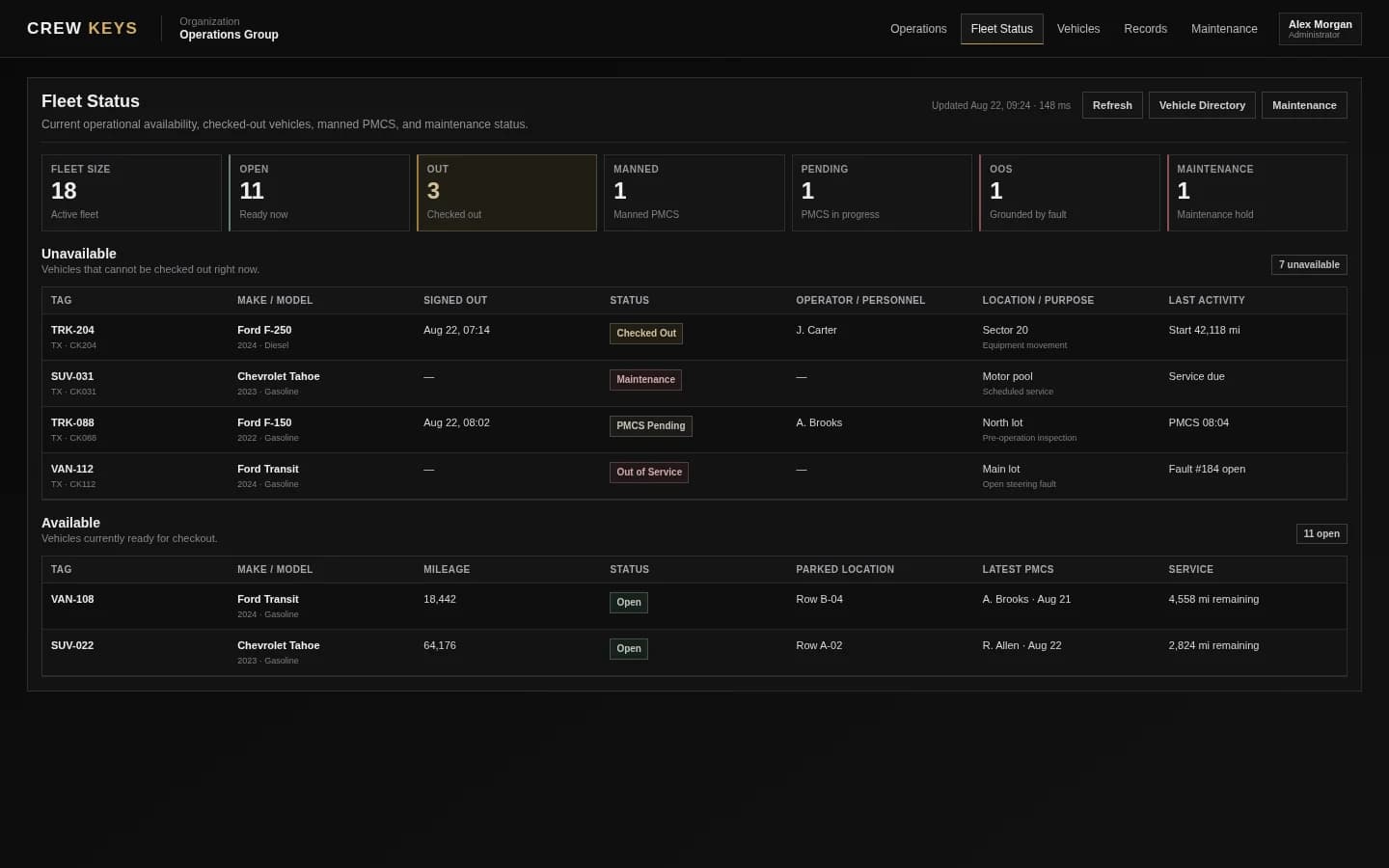
A five-minute morning review
A small fleet needs an exception list, not another meeting.
At the beginning of the day, the coordinator should be able to identify vehicles still signed out, vehicles awaiting inspection, vehicles unavailable for repairs, and the day's planned reservations. If all four are clear, there is little reason to ask every driver for a status update.
When a van is needed for an afternoon job, the person assigning it should see the recorded status—not guess from where it is parked. A parked vehicle might still be reserved, have an unresolved fault, or be awaiting a completed return.
A realistic weekly rhythm
Review exceptions daily; fix the process weekly.
The driver or key-desk attendant records who took the vehicle, when, its mileage and any condition concerns. Record the return when it actually happens.
Check unreturned vehicles, conflicting reservations, out-of-service units and urgent defects. The five minutes is an illustrative review goal, not a guaranteed savings claim.
Look for recurring complaints and upcoming service each week. Monthly, compare usage, repair spending and missing handoff records to decide which process needs attention.
When to change the system
Spreadsheets can work until the number of people updating them becomes the problem.
One well-maintained workbook may be enough for a single coordinator. Once multiple employees need simultaneous availability, verified handoffs and defect reporting, duplicated files and text threads create version-control problems. That's the point to evaluate a shared system—not because 15 is a magical vehicle threshold.
Use the free administration cost calculator to estimate how much time your current process actually consumes. For a walkthrough of real availability and custody screens, visit the Crew Keys demo.
Continue reading
Related Crew Keys workflows and resources.
From template to workflow
Give one coordinator a reliable picture without making them chase everybody.
Crew Keys can connect vehicle availability, reservations, actual handoffs, inspections and fault status in one organization workspace.