
Free printable vehicle handover form
Vehicle handover checklist and return form for company vehicles.
Use this free one-page PDF checklist when a company car, truck or van changes hands. Check condition, record who received the vehicle and its keys, note existing damage, mileage and fuel, then close the same form when the vehicle comes back. This is a single-vehicle handover checklist—not a running vehicle sign-out sheet or a GPS tracking system.
Crew Keys example
The same responsibility transfer can be documented in Crew Keys.
This is the actual Crew Keys checkout interface—not a screenshot of the downloadable PDF. The digital flow connects the operator and vehicle with trip details, inspection and eventual return.
Actual Crew Keys interface · fictional demonstration vehicle and operator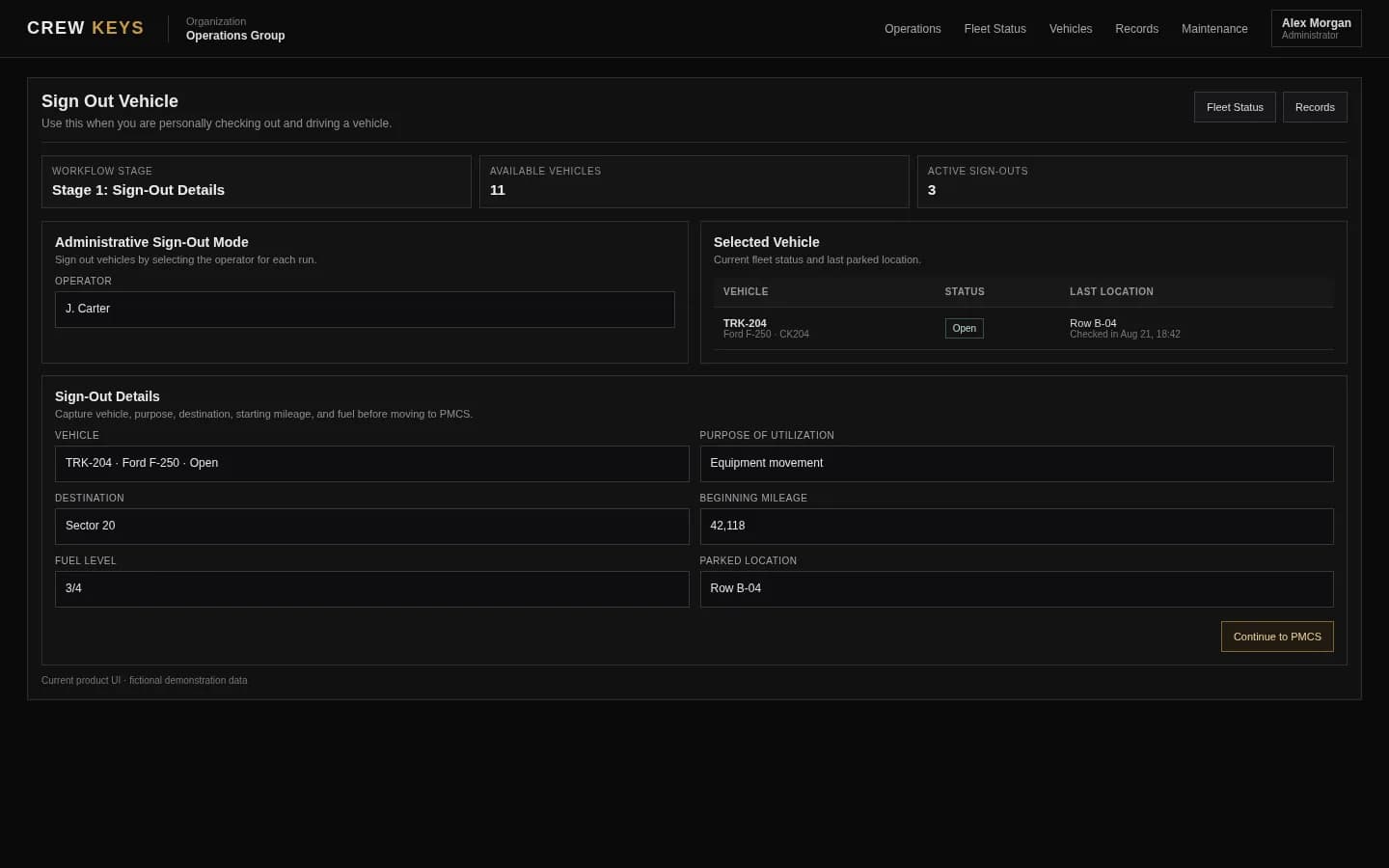
One-page printable PDF
Give every vehicle handover a clear beginning and end.
The form has distinct handover and return sections, so it is easier to distinguish pre-existing damage from a new concern noticed at return. It includes a simple OK / Issue checklist, key count, accessories, signature lines and room for handwritten notes.
Use one form per vehicle transfer. Print the PDF at Letter size and complete it together at the vehicle. Keep the signed copy according to your organization's recordkeeping policy.
What's on the form?
What should a company vehicle handover checklist include?
The checklist answers three practical questions: what was handed over, what condition was it in, and who accepted responsibility for it?
| Section | What to record |
|---|---|
| Vehicle and driver | Record the exact unit or plate, employee taking the vehicle, person issuing it and departure time. |
| Mileage and fuel | Read the odometer and fuel at handover; compare again when it comes back. |
| Condition | Inspect tires, glass, mirrors, lights, interior, warning lights and visible leaks. Mark OK or Issue on every line. |
| Existing damage | Write visible defects down before the keys move; attach photos to your own records if your policy requires them. |
| Keys and accessories | Count keys and document fuel cards, registration documents, equipment or other issued items. |
| Signatures | Have the issuer and driver acknowledge the recorded handover. Use the return area to close responsibility. |
Form preview · printable content
Condition and custody are checked at handover, not reconstructed afterward.
This preview shows the primary fields on the downloadable PDF. The actual file provides writing lines, OK / Issue checkboxes and separate return signatures.
| Condition at handover | OK | Issue | Condition at handover | OK | Issue |
|---|---|---|---|---|---|
| Tires / wheels | □ | □ | Glass / mirrors | □ | □ |
| Lights / signals | □ | □ | Body / exterior | □ | □ |
| Interior / cleanliness | □ | □ | Warning lights | □ | □ |
Also included in the download: starting and ending mileage, fuel levels, existing damage, key count, issued accessories, return observations and signatures.
Practical process
How do you document handing a vehicle to an employee?
Walk around the vehicle with the employee before releasing the keys. Compare the odometer to the last recorded return, note fuel and visible condition, and mark any existing issues. Record accessories or keys that need to come back. Have both people acknowledge the recorded details.
At return, check the vehicle again, collect the keys and equipment, record the ending mileage and fuel, note new defects and document who accepted it back. If something is unsafe or damaged, follow your organization's inspection and repair procedures rather than assuming a signed form means the vehicle is ready for its next trip.
Manual versus digital
When is a paper vehicle handover form not enough?
Paper works when transfers are occasional and there is one dependable place to store the completed forms. Once multiple employees and locations share vehicles, staff may need to call around to learn who currently has a unit. A physical form also does not update a live availability board.
In Crew Keys, the actual checkout records the responsible operator, and return closes the custody window. Required inspections and existing faults remain tied to the vehicle's records. Drivers still need to enter accurate information; it is not automatic GPS verification.
Continue reading
Related Crew Keys workflows and resources.
Use a running paper or Excel log when many vehicles are checked out each day.
Get the sign-out template Vehicle checkout softwareRecord the actual driver and custody handoff through the browser.
See vehicle checkout Vehicle inspection checklistSee how vehicle condition findings stay connected to the operator and vehicle.
See vehicle inspections Vehicle return and check-inKeep reported return mileage, fuel, location and issues in the completed record.
See vehicle return Fleet resourcesFind other free guides and templates for company vehicle operations.
Browse fleet resourcesFrom template to workflow
Turn individual handover forms into a vehicle history.
Crew Keys supports actual-driver checkout, required inspections, return details, vehicle status and searchable records—without installing tracking hardware or replacing your physical keys.